
MobiDash internals: ghost clicks and SSH tunnels in commercial adware
MobiDash evolved from simple adware into a sophisticated Android fraud platform that hides inside repackaged legitimate apps, combining click injection, phantom ad rendering via VirtualDisplay and residential proxy infrastructure, all orchestrated by a C2 server capable of pushing live code to infected devices.
MobiDash has been around for years, repackaging legitimate apps with ad fraud payloads. Four samples landed on our desk recently, and while the packaging was textbook — SQLCipher blobs, ContentProvider bootstrap, C2 domain rotation — the monetization stack told a different story. These aren’t just ad popups anymore. We’re looking at a full-service fraud platform: click injection that slips past ad network detection, residential proxy infrastructure that could sell victim bandwidth and a C2 that coordinates it all. The adware business has grown up.
The parasite and its defenses
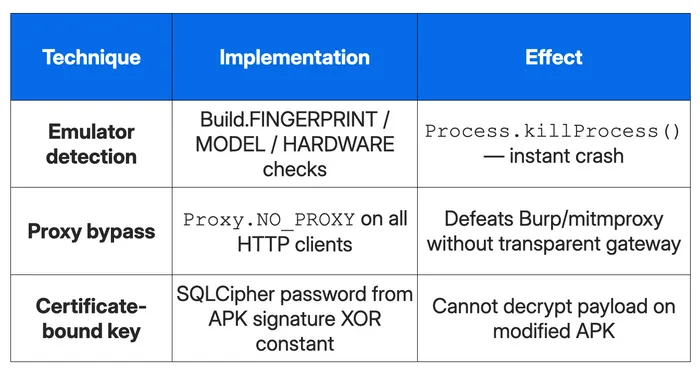
MobiDash doesn’t ship as a standalone app, it’s injected into legitimate APKs by an automated patcher tool. The injection is surgical: a ContentProvider gets registered (runs before Application.onCreate()), and an SQLCipher database drops into assets with the encrypted payload chain. The database password is derived from the APK’s signing certificate XOR’d with a per-sample constant — you can’t crack it offline without reversing the bootstrap code first. The original app’s code stays untouched; it just gets a “parasite”.
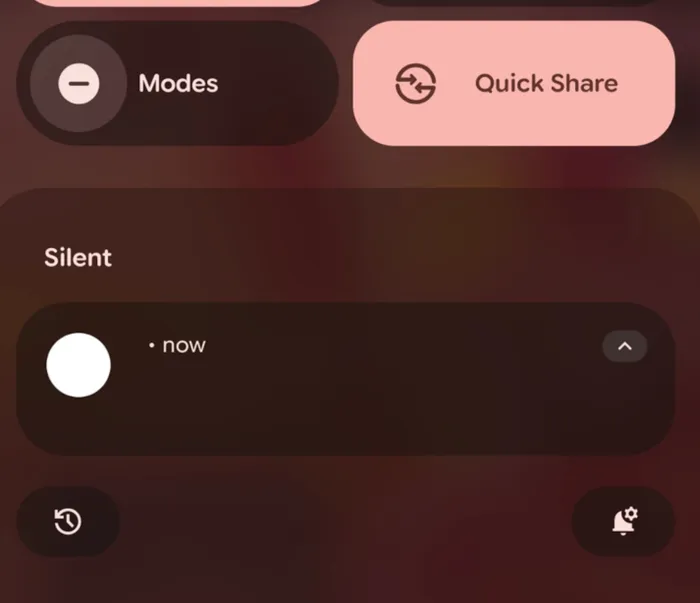
Figure 1: blank notification allows the SDK to run in the background without being too obvious
Before any payload runs, the SDK checks Build.FINGERPRINT, MODEL, HARDWARE and other common indicators for emulator signatures. Detection triggers Process.killProcess() — leading to immediate termination. Combined with Proxy.NO_PROXY on all HTTP connections (defeating Burp/mitmproxy unless you’re using a transparent gateway), it might be enough to slow down the casual analyst.
Repackaging an APK means re-signing it. Ad SDKs such as Unity, IronSource, AppLovin and StartApp verify the host app’s signing certificate, package name and version before serving ads. MobiDash solves this by replacing the application’s base context via reflection on ContextWrapper.mBase, swapping in a custom PackageManager that intercepts getPackageInfo() calls. The C2 pushes the original developer’s certificate (Base64-encoded DER), package name, version and even the Play Store installer tag. When an ad SDK queries the app’s identity, the hook returns the forged values; all other callers get the real ones. To avoid tripping non-SDK code, each ad network gets its own PackageManager subclass that inspects the call stack, matching hardcoded StackTraceElement strings down to the source line number, and only activates the spoof when the caller is a whitelisted SDK method like Device.getCertificateFingerprint or ApplicationContext.getAppPackageInfo.
The C2 pushes config updates that get persisted locally: ad network credentials, timing parameters, domain lists, proxy settings. But the same mechanism that delivers configs can deliver code. The InMemoryDexClassLoader infrastructure is already there; a server-side flip could push new modules without touching the APK. Today it’s ad fraud and proxy nodes. Tomorrow it could be banking trojans or ransomware. The adware classification understates the risk.
The AUTOCLICK fraud that doesn’t click
Ad fraud on Android has a fundamental problem: you can’t just spam a click URL directly. Ad networks validate clicks through session tokens, cookies, referrer chains and JavaScript viewability checks, all of which arebound to the WebView that rendered the ad. A raw HTTP request to the click endpoint would fail validation instantly. The click has to originate from inside the ad’s own rendering context, from a genuine MotionEvent flowing through the view hierarchy.
MobiDash’s solution is elegant and disturbing. It loads real ads in real WebViews, then fabricates touch events and injects them directly into the WebView via dispatchTouchEvent(). From the ad network’s perspective, a human finger just tapped the ad. The session is real, the cookies are real, the JavaScript click handler fired normally. The only thing fake is the finger.
Three ways to render an ad
Each banner from the C2 carries a display mode field: VIRTUAL, INTERNAL or EXTERNAL. The interesting one is VIRTUAL. The SDK creates an Android VirtualDisplay at the C2-specified resolution and DPI (matching the device’s real screen parameters), wraps it in a Presentation and renders a full WebView inside it. The display isn’t connected to any surface visible to the user. The ad loads, trackers fire, viewability JavaScript confirms “yes, this is on-screen,” but there’s no screen. It’s a phantom viewport.
INTERNAL renders a visible full-screen WebView activity, but sets its TaskDescription to an empty string with a 1×1 transparent bitmap, invisible in Recent Apps. EXTERNAL just opens a URL in the device’s browser. All three modes suppress JS dialogs (alerts, confirms, prompts auto-confirmed), disable Safe Browsing, allow mixed content and enable media autoplay.
The C2 action script protocol
Here’s where it gets interesting. The C2 doesn’t just tell the SDK “click the ad.” It sends a complete interaction script — a choreographed sequence of JavaScript injections and touch events with precise timing. Each banner’s JSON payload includes an actions array of individual steps:
Step 1 — JavaScript injection: A Base64-encoded script string. Decoded on-device and executed via evaluateJavascript(). Typical use: scroll a target element into view, query DOM coordinates, dismiss a consent dialog.
Step 2 — synthetic touch: A JSON array of {type, x, y} objects. The type field maps directly to Android’s MotionEvent action constants: 0 = ACTION_DOWN, 1 = ACTION_UP, 2 = ACTION_MOVE. The x and y are pixel coordinates within the WebView. A realistic click is DOWN → slight MOVE → UP.
Step 3 — completion signal: Fires BANNER_CLOSED through the lifecycle system, triggering cleanup (cookies cleared, VirtualDisplay dismissed, status reported to C2).
Each step carries a wait value in milliseconds. The orchestrator queues all steps on the WebView’s Handler with cumulative delays, so the C2 can script an entire interaction: “inject JS to find the button, wait 2 seconds for the scroll animation, touch at the computed coordinates, wait 1 second, signal done.”
Proxies all the way down
Two of the samples bundle proxy infrastructure. Sample three includes Hopmon SDK, a proxy monetization kit with native 3proxy binaries. Sample four has a complete custom SOCKS5 stack with an obfuscated JSch SSH client baked in.
The architecture: C2 pushes a "proxy" command with SSH credentials; the device establishes a reverse port forward through JSch and a local SOCKS5 server (using default credentials) handles proxied requests. Traffic exits through the victim’s connection. Private IP ranges are blocked, for either operational security.
The proxy server holds a WakeLock disguised as "com.android.chrome:ChromeUpdater". TTL and keep-alive intervals are C2-configurable. Each ad banner from the C2 can also carry its own proxy credentials — host, port, username, password — embedded right in the JSON. Before loading the ad in the WebView, the SDK applies those credentials as the app’s HTTP proxy via Java system properties and forces WebView to pick them up through reflection on Android’s internal ProxyChangeListener; when the next banner with no proxy field loads, it clears them.
The likely purpose is geographic fraud: ad impressions from Tier-1 countries (US, UK, DE) pay 10–50x more than from the regions where most infected devices are located. Per-banner proxy credentials would let the C2 route an ad impression from Lagos through a London exit node on demand, therefore generating two potential revenue streams from one infrastructure: either bandwidth-as-a-service sold externally and/or geo-spoofed CPMs consumed internally.
Indicators of compromise
How Jamf helps
Jamf helps IT and security teams harden mobile devices and maintain a safe and secure operating environment for work. When Jamf Threat Labs discovers and validates malicious activity, such as the MobiDash adware outlined in this article, the IOCs are immediately added to our mobile platform, helping customers stay ahead of the mobile threat landscape.
On top of that, there are other actions organizations should take. We recommend mobile devices run only approved OS versions, apply all relevant patches, and meet security baselines. Any device falling out of compliance should automatically be isolated from corporate resources until remediated. This foundation ensures that malware outbreaks can be stopped before they start. Jamf can help establish security baselines for Mac, iPhone, iPad, Apple TV, Apple Vision Pro, Apple Watch and even Android devices.
Organizations are also advised to setup an enterprise app store to control which apps are allowed on mobile devices used for work. At the very least, disable the ability for alternative app marketplaces to be used on work devices. Both Apple’s App Store and the Google Play Store perform checks on apps and developers before users can download, helping to prevent the distribution of (otherwise legitimate) apps that have been injected with MobiDash. Jamf provides the foundations for both Apple and Android Enterprise app stores, and can disable access to third-party app marketplaces.
Jamf enables IT and security teams to perform additional analysis of all work apps, bringing additional insights into the risks they present to the organization. Whether your team wants to identify apps with flawed crypto implementations or those that present a privacy risk to your users, Jamf’s App Insights report is a great starting point for the assessment.
Finally — and most effective for the MobiDash adware — organizations should follow best practices by applying network filtering rules for mobile devices, similar to the policies designed for desktop devices that use the corporate network. Web filtering and phishing protection, core components of the Jamf platform, provide protections across all apps and browsers on the device, not just email. And these mobile-first capabilities help keep mobile devices secure, regardless of which network they use to access the internet (corporate, public or cellular).
Read the latest research from Jamf Threat Labs.