
The hidden risks in your mobile apps
With nearly one in six mobile apps containing known vulnerabilities and two-thirds using weak encryption, organizations need to find ways to protect their data and maintain security in an increasingly mobile-first workplace. Learn more.
When you think of a day at work, what do you picture? A person sitting in a cubicle, typing away at their computer? Or a remote worker, enjoying a latte and taking a Zoom meeting at their favorite cafe? A receptionist answering a ringing landline and clicking away on their desktop computer?
All of these probably are right to some degree. But we can’t forget an important part of the picture: mobile phones. According to Adobe, 95% of Americans used their mobile phones for work in 2025. Industries like hospitality and tourism spend 12% of their workweek on these devices. Creative arts, 10%; retail, 9%; healthcare, 7%; and so on.
Mobile devices run on apps, each with different developers, update cadences, capabilities, permissions and more. Making sure each app is at its most secure can be tricky — this effect is compounded with each additional app your company deploys.
As such, organizations have to work hard to evaluate and mitigate any risks their mobile apps introduce to their security posture. Application management is critical; automating the app lifecycle goes a long way to preserve security. But to ensure you’re closing the gaps in your security posture, you first have to understand what risks apps bring to the table.
In this blog, we’ll discuss:
What increases your mobile risk profile?
Mobile apps introduce different risks based on how your organization manages them. Your organization’s risk profile will look different from others, based on your setup and risk tolerance.
Unmanaged/partially unmanaged devices
When employees use corporate-owned devices, IT controls what apps can be installed and how often they must be updated. Many companies use a bring-your-own-device (BYOD) model, where employees enroll their personal devices to access work resources. This creates two distinct profiles on their phone — personal, which remains private, and work, which can be managed by IT.
The work partition functions much like a fully managed device. IT can deploy, remove and updates apps as needed to keep the device secure. But what about the personal side, which is opaque to IT? What if a user downloads a vulnerable app, including from a third-party app store? How can IT control the flow of data between work apps and personal apps? All of this can make it easier for attackers to compromise your data.
App architecture
Even though apps run in a sandbox on your device, they aren’t risk free. They may use third-party software development kits (SDK) or libraries. You can’t always tell what version the app might use — therefore you don’t know the ways they’re vulnerable. This can lead to supply chain attacks.
Generally, the latest version of the app is the most secure, containing the latest vulnerability patches. But of course, new features can introduce new vulnerabilities too. Updates can change your risk profile, needing reevaluation with each new version.
Mobile-specific permissions and features
We carry our mobile devices everywhere. Our devices can determine our location, record our surroundings and contain loads of personal information, often more so than desktop apps. Apps request access to these components — if an app gets compromised, so does our privacy. Combine this with connections to unprotected public Wi-Fi, and your risk profile increases.
Ecosystem pressure
Apple vets all apps listed on the App Store, ensuring the app contains no software that’s malicious or privacy violating. In 2024, Apple rejected more than 1.9 million submissions to the App Store for “failing to meet the company's standards for security, reliability, and user experience, including for privacy violations or fraud concerns,” according to MacRumors. And in the same year, Apple stopped over $2 billion in potentially fraudulent transactions and blocked nearly 2 million risky app submissions from reaching users. All this to say that attackers are trying to get malicious apps approved, and pressure is increasing.
They have an easier time at this in the EU, where developers can create an app marketplace to distribute their apps — no Apple vetting required. These apps aren’t held to the same quality and security standards, greatly increasing the risk of malicious apps.
The numbers behind the risk
Mobile apps offer diverse risk. Some our beyond your control. Your organization may be built to handle some and not others, and your risk tolerance will differ from other organizations. But to know how to address these risks, we need to be informed — what risks can we observe in the wild?
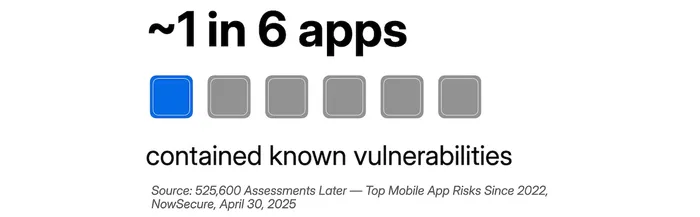
According to analysis across iOS and Android by NowSecure, nearly one in six mobile apps of the over 500,000 they analyzed had software components with known vulnerabilities. Many of these apps rely on third-party SDKs, which can be difficult for organizations to detect and manage.
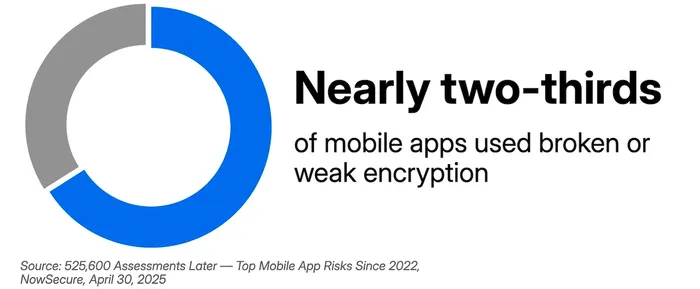
Security misconfigurations can wreak havoc. With nearly two-thirds of the apps NowSecure scanned showing broken and weak encryption, organizations have to select their apps carefully and find other ways to protect their data in transit.
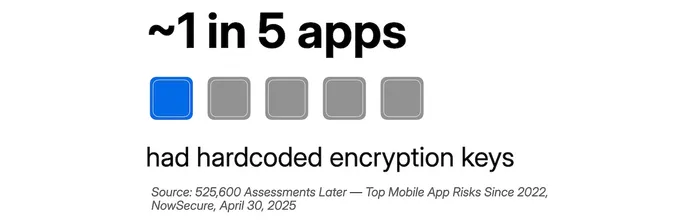
Hardcoded encryption keys are critical security flaws that NowSecure found in ~20% of mobile apps — further emphasizing the importance of data protection.
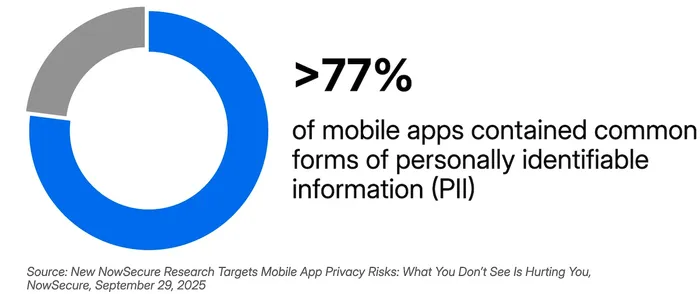
Vulnerable apps mean vulnerable data. According to NowSecure, over three-quarters of apps have personally identifiable information (PII). Companies aiming to protect their data and their employees’ privacy have to be up for a challenge — and the stakes are high.
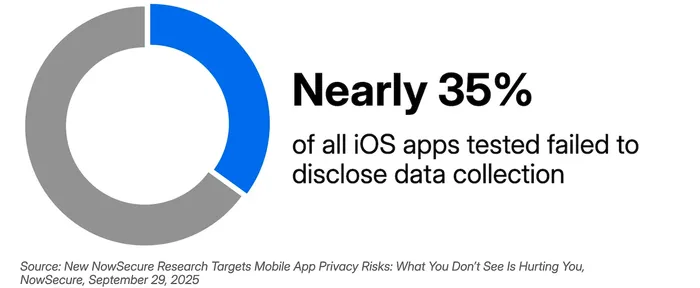
As we already mentioned, Apple has strict requirements for apps listed on the App Store. Developers must disclose how they handle any user data collected by their app. But this isn’t done perfectly — nearly 35% of scanned iOS apps failed to disclose data collection.
All of this points to this: the mobile app ecosystem is not safe by default. Organizations need visibility, vetting and continuous monitoring to ensure that they’re protected.
How to mitigate your app risks
Hopefully, you’re already automating your app lifecycle management.
Learn more about application management >>
Let’s look at some other strategies that help reduce the impact of app-related risks.
Determine your risk tolerance.
Your risk tolerance depends on a variety of factors, like your industry, regulatory requirements, location and more. Determine what risks you can tolerate and those you cannot. Consider:
-
The types of data your apps handle
-
What regulatory requirements your company is subject to
-
Features required to complete job functions
-
Possible attack vectors
Establish an app vetting process.
Once you define your risk tolerance, you can decide what apps can stay and what must go. Choose what apps:
-
Can be offered in your self-service portals or deployed to devices
-
Are restricted from devices
-
Are needed for work but require additional device protections
Maintain a current inventory of mobile apps.
Your mobile device management (MDM) platform keeps an inventory of apps on managed devices, including:
-
App names
-
Bundle IDs
-
Package names
-
Versions
-
Installation source (App Store, MDM, sideloaded)
With this information, your organization can be aware of and addressed any risky apps and/or versions.
Leverage external intelligence and industry benchmarking.
There are so many mobile apps and so many vulnerabilities to manage. Thankfully, you aren’t on your own. Repositories like the Common Vulnerabilities and Exposures (CVE) database list known vulnerabilities. Other threat intelligence sources, like research firms or government agencies can help too.
Industries like finance, healthcare and retail offer security strategies. Adopting recommended best practices will help keep your organization safe — plus you may be legally required to follow them.
Enable continuous monitoring and risk scoring.
We just mentioned using external sources to find vulnerabilities. Your security software can do this for you (thankfully), and list their risk score. This way, you can stay on top of threats and address them in order of importance.
Strengthen policies and governance.
Improve security by enforcing compliance standards. Beyond your own policies and procedures, refer to standards and frameworks like:
Implement app risk mitigation and management.
Your security software identifies risky apps — your MDM can help you remediate. These tools will:
-
Automatically block and quarantine malicious processes
-
Restrict access to enterprise applications
-
Alert users and administrators about issues
That way, the time between detecting problematic apps and solving the issue is minimized, lowering the potential fallout.
Conclusion
Mobile apps have become the backbone of modern business operations, but this convenience comes with significant security trade-offs. One in six apps contains known vulnerabilities, two-thirds have weak encryption and over three-quarters handle sensitive personal data. These aren't abstract risks — they're active threats to your organization's security posture.
The good news? You're not powerless. By implementing continuous monitoring, establishing clear app vetting processes and leveraging automated risk management tools, you can dramatically reduce your exposure while maintaining the productivity benefits that mobile apps provide.
Ready to take action? Start with these three immediate steps:
-
Audit your current mobile app inventory: You can't protect what you can't see.
-
Conduct a comprehensive risk assessment: Identify your highest-risk applications first.
-
Establish clear mobile app governance policies: Define what's acceptable before the next security incident
The mobile threat landscape will only grow more complex, but organizations that act now to understand and mitigate app-related risks will be far better positioned to maintain security.
Stop mobile app risks before they impact your business
Try Jamf today.