What is Punycode? Fake domains that deceive the human eye
Discover how punycode enables deceptive URLs that mimic trusted domains, making phishing harder to spot and how to better protect yourself.
Introduction
Punycode allows non-ASCII characters in domain names, but attackers exploit it to create deceptive URLs that look legitimate while redirecting users to malicious sites. These homograph attacks affect browsers and mobile apps, making phishing campaigns harder to detect, especially on small screens. Research shows mobile users face increased risk as apps often fail to flag punycode domains. Strong security tools and cautious user behavior are essential defenses.
Key takeaways
- Punycode disguises malicious domains, making fake sites look identical to trusted brands.
- Mobile users face higher risk because apps and small screens hide critical URL clues.
- Layered security matters, including browser protections, MFA, machine learning tools and careful user scrutiny.
What is Punycode?
Punycode
noun
Unicode that converts words that cannot be written in ASCII. For example, the Greek word for “thank you” is ευχαριστώ, and when converted into an ASCII encoding, like xn--mxahn5algcq2e, it can be used as to register an Internationalized Domain Name (IDN).
In the following sections, we explore how this seemingly irrelevant encoding process can have a big impact on keeping users safe from cyberattacks.
Where does Punycode come from?
Punycode is a way of converting words that cannot be written in ASCII, into a Unicode ASCII encoding. Why would you need to do this? The global Domain Name System (DNS), the naming system for any resource connected to the internet, is limited to ASCII characters.
With punycode, you can include non-ASCII characters within a domain name by creating bootstring encoding of Unicode as part of a complicated encoding process.
What are ASCII and Unicode?
Every letter, character or emoji we type has a unique binary number associated with it so that our computers can process them. ASCII, a character encoding standard, uses 7 bits to code up to 127 characters. That small bit count is enough to code the alphabet in upper and lower case, numbers 0-9 and some additional special characters.
Where ASCII stumbles are that it does not support languages such as Greek, Hebrew and Arabic. However, this is where Unicode comes in; it uses 32 bits to code up to 2,147,483,647 characters! Unicode provides enough options to support any language and even the ever-expanding collection of emojis.
How does a Punycode attack work?
Unicode characters can look identical to standard Roman letters but represent completely different web addresses. Because some Roman letters resemble characters in Greek, Cyrillic and other alphabets, attackers can register domains that swap familiar ASCII characters with similar-looking Unicode symbols. For example, replacing a normal T with the Greek tau (τ) appears harmless to users, but the underlying punycode is xn--5xa. Depending on how a browser displays it, this subtle change is easy to miss.
This technique is called a homograph attack. The URL looks legitimate and the page may appear normal, but it is a different website altogether, designed to trick users into giving up sensitive information or infecting devices with malware. These attacks are often coupled with phishing, forced downloads and online scams, while serving as the tip of the spear for larger campaigns.
Does punycode affect all browsers?
By default, many web browsers use the xn-- prefix known as an ASCII compatible encoding prefix to indicate to the web browser that the domain uses punycode to represent Unicode characters. This is a measure to defend against homograph-based phishing attacks.
However, not all browsers display the punycode prefix, leaving visitors none-the-wiser.
For example, Chinese security researcher Xudong Zheng discovered a loophole that allowed him to register the domain name xn--80ak6aa92e.com, bypassing protections so that it appears as “apple.com” by all vulnerable web browsers.
Visiting the domain above from current versions of Google Chrome and Apple Safari shows the following behavior:
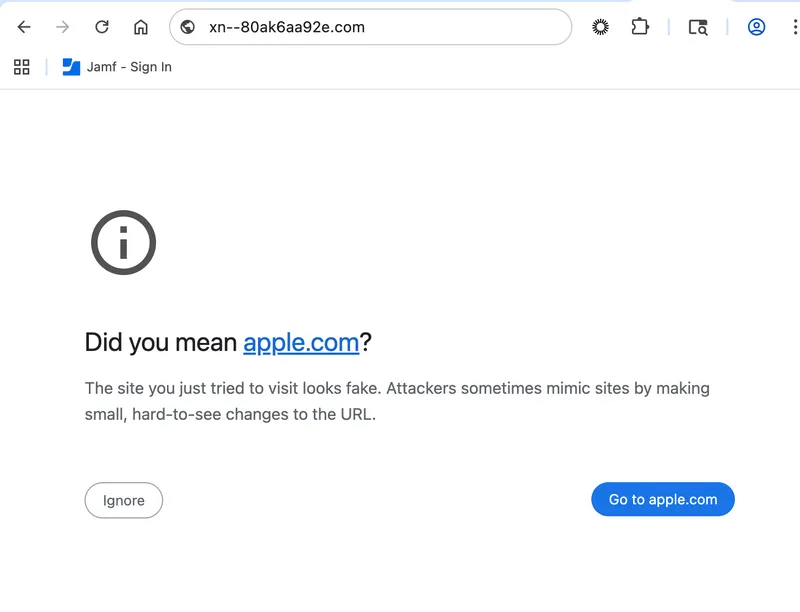
Screenshot of Google Chrome warning the user of a possibly deceptive website.
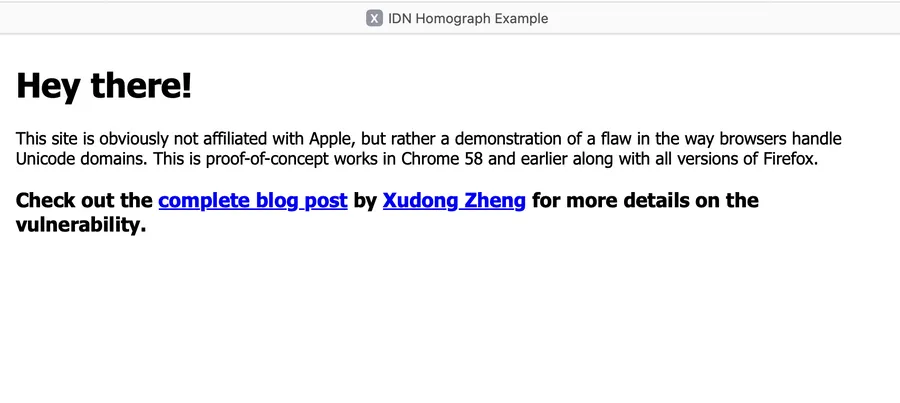
Screenshot of Apple Safari displaying the website as intended without a warning message.
What about mobile apps?
Punycode attacks affect mobile platforms as well as desktop software because most browser developers handle Unicode the same across devices. If a browser displays Unicode on one platform, it does so on all of them. Research often focuses on browser behavior, but app behavior is just as important.
In our testing, some popular communication and collaboration apps did not flag deceptive punycode domains on iOS or Android. To maintain a smooth user experience, many apps display deceptive Unicode, reducing protections against malicious sites. App developers share responsibility for enforcing stronger layers of security to defend against these attacks.
Why are they a bigger problem on mobile?
Our research into punycode attacks on mobile uncovered several new malicious domains that host phishing pages designed to deceive users. These sites are optimized for mobile, showing that attackers understand how hard it is for users to spot deceptive URLs on small screens. By focusing on mobile targets, these campaigns are generally more successful because phishing is already harder to detect on mobile – and punycode makes it even more difficult.
Smaller screens limit the space available to review a URL. Mobile operating systems often hide the address bar as users scroll. People are more likely to rush through pages and notifications while distracted. Mobile devices also lack mouse-over or preview features, which prevents users from checking a link’s destination before tapping.
Can you spot the Unicode character in the domain below?
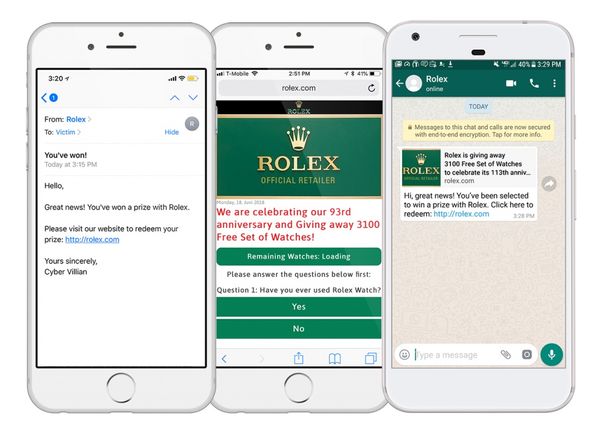
Three websites displayed on iPhone.
What impact do emojis have in punycode attacks?
In the same way that special characters of different languages are encoded as punycode so too can the ever-growing library of emojis. An emoji domain is literally a domain with an emoji in it e.g. www.��.com, punycode is essential for this.
Here’s a recent example identified by Jamf's intelligent machine learning tool, MI:RIAM:
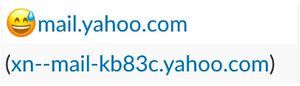
Screenshot of an email registered with an IDN, mimicking a legitimate email address.
Are there any examples of a punycode-based attacks in the wild?
Specific information on the growth of punycode is difficult to assess because punycode in and of itself is not an attack, but rather the vessel that delivers a malicious payload. As mentioned previously, punycode is often paired with another threat, like phishing or social engineering campaigns, to obtain sensitive data from its victims, install malware or exploit vulnerable devices.
While Jamf’s research has been identifying punycode URLs since 2017, the combination of punycode and modern phishing tactics has led to several trends based on the continued effectiveness of these social engineering techniques. Such as:
- GenAI usage increases attack sophistication and personalization.
- Smishing is quickly becoming more successful than email on mobile devices.
- QR codes embedded with punycode attacks have surged 587% since 2023.
- Attackers are misusing legitimate services to evade detection and bypass security tools.
- 0-click account takeovers (ATO) exploit system handling to redirect password reset links to deceptive punycode addresses.
What steps protect against punycode attacks?
- Be cautious of sites that rush you. Urgency, timers and pop-ups are classic tricks to distract and steal information.
- Verify deals on the brand’s official site. If it is not there, it is likely a scam.
- If the URL or design looks strange, retype the address or open the real site in a new tab. Odd characters often signal punycode deception.
- Use a password manager with built-in site checks to avoid entering credentials on fake pages.
- Use trusted browsers from official sources and keep them updated with the latest security fixes.
- If your browser lacks punycode protection, add an extension that flags suspicious URLs.
- Check the HTTPS certificate. If the domain or spelling does not match, the site is likely fake.
- Use modern security tools with machine learning to block zero-day phishing links.
- Enable multi-factor authentication to reduce unauthorized access and password-reset abuse.
- If something feels off or too good to be true, stop immediately and do not engage.
Subscribe to the Jamf Blog
Have market trends, Apple updates and Jamf news delivered directly to your inbox.
To learn more about how we collect, use, disclose, transfer, and store your information, please visit our Privacy Policy.