Developer Mode-as-a-Defense: How iOS Security Features Deter Nation-State Spyware
Discover how combining Jamf Mobile Forensics with Developer Mode creates an environment that sophisticated malware is engineered to avoid.

Authored by: Nir Avraham and Yuan Shen
A defensive opportunity hidden in plain sight
When Apple introduced Developer Mode in iOS 16, it was designed for developers testing and analyzing apps they’ve designed through Xcode on their mobile devices. What Apple may not have anticipated is that this same feature would become a defensive asset against some of the most sophisticated threats in the mobile landscape.
During the reverse engineering of Predator spyware, we uncovered something significant: nation-state surveillance tools actively detect Developer Mode and refuse to execute when it's enabled. The malware interprets this setting as a sign that the device belongs to a security researcher or someone analyzing their device, which is an environment malware is specifically designed to avoid.
This creates an unusual defensive opportunity. By enabling Developer Mode on devices protected by Jamf Mobile Forensics, organizations turn adversarial tradecraft against attackers.
Key recommendations
Developer Mode should only be enabled on iOS devices where Jamf Mobile Forensics is actively running. The protective value comes from the combination of both components working together:
- Jamf Mobile Forensics provides active security monitoring, behavioral analysis and incident response capabilities.
- Developer Mode signals to sophisticated malware that the device may be an analysis environment, triggering self-termination.
This isn't a blanket recommendation to enable Developer Mode everywhere. For devices without XDR protection, maintaining the standard iOS security posture (Developer Mode disabled) remains the appropriate configuration.
Why this combination works
Enhanced forensic capabilities
Developer Mode grants Jamf Mobile Forensics authorized access to system-level data and diagnostic information that iOS otherwise restricts. This enables:
- More thorough device health assessments
- Detailed process inspection
- Comprehensive behavioral monitoring
Without Developer Mode, these investigative capabilities are significantly constrained.
Proactive malware deterrence
Sophisticated malware platforms invest heavily in detecting analysis environments. Security researchers typically enable Developer Mode when examining iOS samples, so malware authors use this as a signal to abort execution and avoid exposure.
Our Predator analysis documented this behavior precisely: when the implant detects Developer Mode is enabled, it reports error code 301 to its command-and-control server and terminates immediately, without performing any surveillance activities.
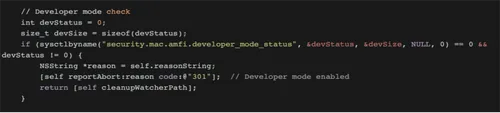
Upon detecting Developer Mode (devStatus != 0), the implant calls reportAbort:reason code:@"301" to notify operators, then executes cleanupWatcherPath to remove traces before terminating.
Protection against unknown threats
This deterrent effect is particularly valuable against zero-day threats. Malware that doesn't yet have signatures in any threat database may still implement Developer Mode evasion to protect against analysis. The protective mechanism works regardless of whether the specific threat has been identified or not.
The technical evidence
While reverse engineering Predator, we identified the specific function responsible for Developer Mode detection. The malware queries iOS using the sysctlbyname API with the parameter security.mac.amfi.developer_mode_status. If the returned value indicates Developer Mode is enabled, execution terminates before any malicious activity occurs.
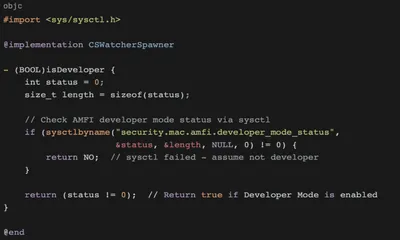
The isDeveloper method queries security.mac.amfi.developer_mode_status through the kernel interface. If the status value is non-zero, Developer Mode is enabled.
This isn't a peripheral check, it's one of the first validations performed when the implant launches, demonstrating how seriously threat actors take research environment detection.
The complete technical analysis on Predator, including full error code taxonomy and all detection mechanisms.
Understanding the threat landscape
Commercial spyware platforms represent one of the most sophisticated threat categories facing enterprise mobile devices. These tools are developed by private companies and sold to nation-state actors for targeted surveillance against journalists, activists, executives and government officials.
These platforms share common characteristics:
- Zero-click exploitation capabilities
- Extensive anti-analysis protections
- Sophisticated evasion techniques
Our research indicates that Developer Mode detection is a common evasion technique across this threat category and the underlying motivation to avoid security researchers is shared by all actors in this space.
Implementation guidance
Organizations considering this configuration should understand that the recommendation is conditional:
If Jamf Mobile Forensics is running on your mobile device, then we recommend enabling Developer Mode; However, if no XDR protection is running on your mobile device, we recommend keeping Developer Mode disabled by default.
The dual-layer protection model only functions when both components are present. Developer Mode alone doesn't provide security monitoring. Together with Jamf Mobile Forensics, they create an environment that sophisticated threats are specifically engineered to avoid.
Conclusion
The discovery that nation-state spyware actively avoids devices with Developer Mode enabled represents a genuine defensive opportunity – but one that must be implemented thoughtfully. The recommendation to enable Developer Mode applies specifically to devices protected by Jamf Mobile Forensics, where the combination provides both enhanced forensic capabilities and proactive malware deterrence.
For organizations facing sophisticated mobile threats, this configuration leverages adversarial tradecraft against attackers by turning their evasion techniques into a defensive advantage.
For questions about configuring Jamf Mobile Forensics, contact your Jamf account representative or try out this recommendation today.