Introducing the redesigned Mac threat prevention. Now available in beta.
The beta release of Mac threat prevention simplifies how Jamf admins can defend their Mac fleets.

Defending Mac with Jamf
To successfully scale Mac at work, organizations require security tools to match the nuances, user experience and workflows of macOS. Jamf’s Mac platform helping organizations scale their Mac program is designed for this purpose. The platform’s security capabilities offer the deep coverage organizations need for Mac, like easily implementing compliance benchmarks, collecting and streaming telemetry, enforcing acceptable use policies and more. One essential capability is threat prevention.
Organizations use Jamf’s security capabilities to prevent a wide range of Mac threats, including:
- Known malware and new variants from running on a device
- Suspicious user behavior and system activities
- Unsafe or malicious activity (marked high-risk by Jamf Threat Labs)
- Tampering or misuse of system extensions or the Jamf Protect agent
Historically, to configure threat prevention, admins had to navigate multiple screens and capabilities in Jamf. Today's Mac threat prevention beta unifies that workflow. Admins can now configure Mac threat prevention from a single location inside Jamf, simplifying the experience without sacrificing coverage.
Mac threat prevention with Jamf
Built on Apple’s Endpoint Security API, the Mac threat prevention beta is an evolution of Jamf’s capabilities. With protections mapped to the MITRE ATT&CK® framework, this next-generation threat prevention helps organizations:
- Automatically detect, block and report a wide variety of threats
- Simplify threat prevention security workflows with an intuitive UI
- Easily customize and define threat categories supporting organizational needs
- Enhance the user experience through improved agent performance
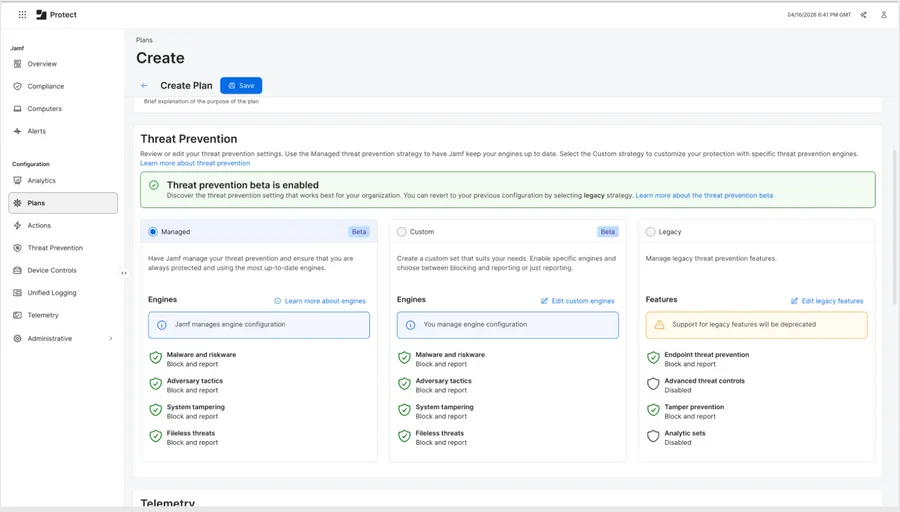
The beta redesign to Mac threat prevention
Mac threat prevention combines static and behavioral threat detection, blocking and remediation into one easy-to-use workflow. Behavioral (or dynamic) threat detection is crucial. It's used to identify and remediate threats based on real-time actions and patterns, instead of identifying known indicators only.
Configuring a threat prevention strategy
There are two new strategies to configure threat prevention: Managed and custom. Both strategies block specific categories of threats through threat-prevention engines.
Managed threat prevention strategy
Managed threat prevention puts Jamf in the driver's seat.
Jamf will manage the plan — ensuring you are always on the most up-to-date engines. When Jamf identifies or blocks a potential threat, you will receive an alert to investigate the activity.
Custom threat prevention strategy
Custom threat prevention strategy lets you enable specific threat engines.
Depending on the engine, you can also choose to:
- Disable the engine
- Only report
- Block and report
Threat prevention engines
Each engine is a modular detection capability that focuses on a specific category of threats or attacker techniques. These engines are designed to be independently configurable, reportable and explainable.
In the Mac threat prevention beta, there are four engines:
- Malware and riskware: This engine uses a combination of static and behavioral analyses to detect malware (like trojans and infostealers), riskware, adware, unwanted software and more.
- Adversary tactics: This engine detects attacker behaviors in real time by monitoring system, user and process activity. This engine is aligned with MITRE ATT&CK tactics and enriched for macOS-specific attacker techniques.
- System tampering: This engine protects the integrity of the Jamf Protect agent from tampering and removal.
- Fileless threats: This engine detects in-memory or runtime threats that bypass traditional file-based defenses, including trusted tool abuse and stealthy memory-based execution techniques.
For updates to the threat prevention engines, subscribe to the Jamf Threat Labs change log.
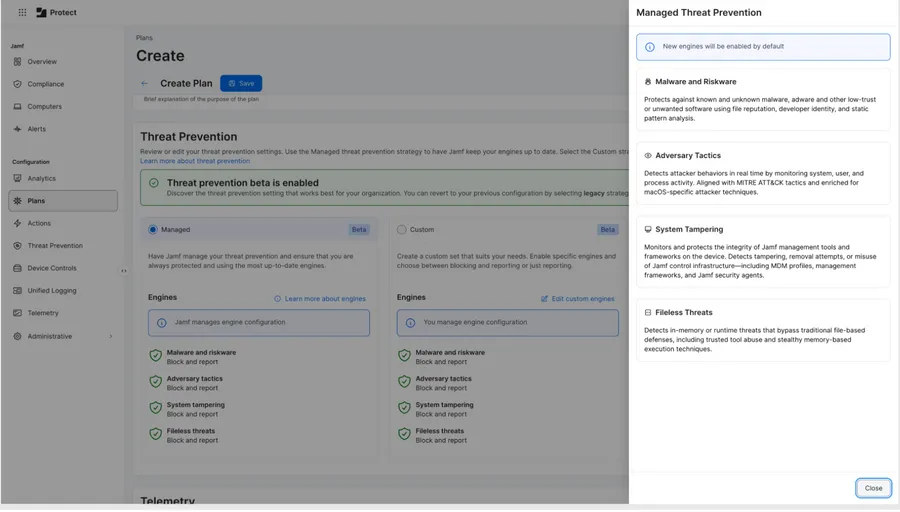
Engine descriptions in the threat prevention beta.
Frequently Asked Questions
How do I access the Mac threat prevention beta?
Log into Jamf Protect via Jamf Account. The beta is accessed on the Plans page by creating a new plan or editing an existing plan.
You can view the technical documents here for in-depth guidance on the beta and how to enroll. (You will need a Jamf ID to view the technical documents.)
What happens to Analytics, Advanced Threat Controls, Threat Prevention and Tamper Prevention?
Mac threat prevention encompasses Analytics, Advanced Threat Controls, Threat Prevention, and Tamper Prevention, now all configurable from one screen. But the legacy capabilities will remain active during the beta. If your organization has Plans currently configured, they will remain active with the legacy strategy. By enabling the beta, your organization can test the redesigned threat prevention alongside your current strategies.
Can I use Custom Analytics and Analytic Sets with the Mac threat prevention beta?
The managed and custom strategies in the Mac threat prevention beta do not currently support custom analytics or Jamf Pro smart group integrations. During the beta, we do not recommend power users of custom analytics, analytic sets and Smart Groups use the redesigned threat prevention capability.
How is Jamf Threat Labs involved?
Jamf Threat Labs’ research fuels many of Jamf’s platform security capabilities. For example, it is instrumental to the Mac telemetry capability, and continues to be for Mac threat prevention. The Jamf Threat Labs team provided their engineering and macOS expertise in the redesign of threat prevention. Along with that, when Jamf Threat Labs adds new threats to the threat changelog all Jamf-managed engines are updated to detect that threat. (In 2026 alone, Jamf Threat Labs added over 26,000 malware samples to the database.)
How are Mac telemetry and Mac threat prevention different?
Mac telemetry provides insights into system, user, network and application activity. This insight surfaces the macOS threat intelligence needed to uncover anomalous activity and behaviors and is used for compliance, investigations and threat hunting.
Mac threat prevention, on the other hand, enables admin security teams to protect against specific threats and risks targeted at Mac. The threat prevention strategies are designed so that Jamf admins can configure what type of plan they want, without having to check in every day.
Conclusion
The beta release of Mac threat prevention signals how Jamf continues to simplify securing Mac at work. This new experience gives admins an easier way to configure threat prevention. By relying on automatic engine updates, guidance on covered threats is not only improved, but novel threats are prevented — all without necessitating admin interaction.
With this beta release, admins with Jamf for Mac (or Jamf Protect) can now test the redesigned workflow and provide feedback by joining the forum over on Jamf Nation.
If you have questions, reach out to your Jamf representative to learn more.