Why fingerprinting is the silent first move in modern mobile attacks
Sophisticated mobile attack kits profile a device before exploiting it, and understanding those checks shows defenders how hardening a phone can make an attacker walk away.
By: Ilan Kolker
When we talk about a mobile exploit, attention almost always goes to the payload: the memory-corruption bug, the sandbox escape, the moment the attacker takes control. But something behind the scenes happens first, and it often decides whether the rest of the attack ever runs. Before a single exploit fires, sophisticated tooling stops to determine what it’s actually looking at and if it’s a target worth exploiting?
That step is fingerprinting: a reconnaissance stage that profiles the device. It rarely makes headlines, yet it shapes everything that follows. This post looks at why fingerprinting matters to attackers and defenders alike, walks through real examples from recent iOS threats and draws out the idea at its core: a lot of what a kit 'knows' about your phone, it's working out indirectly. It often can't just ask, so it prods the device, reads the reaction and figures out what that likely means.
Why fingerprinting matters
Fingerprinting is no minor detail, and the commercial spyware industry has strong economic reasons to get it right. Zero-day exploit chains are expensive to build and finite in value: use one against the wrong target (a researcher's test device, an incompatible OS version, a honeypot) and it risks being analyzed and patched. Burning a chain burns the investment behind it.
The scale of that investment is striking. Commercial surveillance vendors tracked by Google's Threat Analysis Group (TAG) charge in the millions for their services, and leaked proposals TAG analyzed price a full year of mobile-infection capability, with Android and iOS support, at that level. An exploit chain like that is expensive to build and can be neutralized by a single patch, so spending one on a device it can’t actually exploit is an expensive mistake. Fingerprinting protects that asset; the kit throws out targets that aren't worth an exploit.
At a technical level, fingerprinting is three things:
- It's the decision gate. Modern kits don't fire blindly. They profile the target and commit an exploit only when conditions look right.
- It reveals what the attacker fears. A kit checks for a map of its constraints: hardened configurations, the wrong OS version, analysis environments and, tellingly, the target's location. A kit that works to detect a researcher's setup would rather abort than be studied. Location matters too, because commercial spyware often ships with compliance restrictions, like contracts that forbid operating in certain countries, so kits check where they've landed before acting.
- It works against the attacker too. The same checks that make an attack precise also hand the target an advantage. If a kit refuses to run on a hardened device, then hardening yours makes the attacker walk away before trying.
A case study in fingerprinting: Coruna
A brief note for the unfamiliar: Coruna is a sophisticated iOS exploit kit disclosed by Google Threat Intelligence and other researchers in early March 2026, built from 23 exploits across five chains targeting iOS 13.0 through 17.2.1.
Coruna makes a good case study because its reconnaissance stage is easy to look at. The whole thing arrives as a single HTML file hidden in an invisible iframe, and it runs entirely in JavaScript with no interaction needed beyond opening the page. A public deobfuscation of its "Platform Detection Module" shows how that first stage is built: before any exploit fires, the module profiles the device and checks its surroundings.
The checks that follow range from simple device identification to environment and anti-analysis probes, but each works the same way: the kit can't just ask, so it tries something and sees what happens.
A note on the code below: the snippets are simplified from the public deobfuscated code, trimmed to the parts that show what each check does.
Example 1: The simplest signal, the user agent
Before any of the environment probes, the kit reads the browser's User-Agent string, the line of text every browser sends to identify itself. It's the most basic fingerprint there is, and it's what tells the kit which exploit to reach for.
A typical iOS Safari User-Agent looks like this:

From that string, Coruna confirms it's dealing with Safari and extracts the exact iOS version, packing it into a single number: iOS 17.2 becomes 170200.
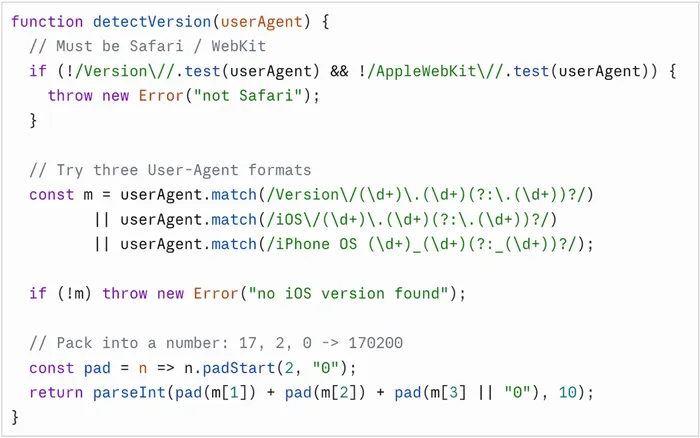
The parser tries three user-agent formats, and if none match, or the browser isn't Safari, it stops. The version number it produces is what decides which exploit runs, since each chain targets a specific range of iOS versions.
Example 2: inferring private browsing
This check starts by branching on navigator.maxTouchPoints, which reports how many touch points a device supports. The kit uses it to pick which storage API to probe: touch-capable devices (like iPhones) take an IndexedDB path, and everything else falls back to a WebSQL and localStorage test that works the same way in spirit. We'll focus on the IndexedDB path.
On an iPhone, the kit opens a throwaway IndexedDB database and tries to store an empty binary blob in it, then watches whether that specific operation fails:
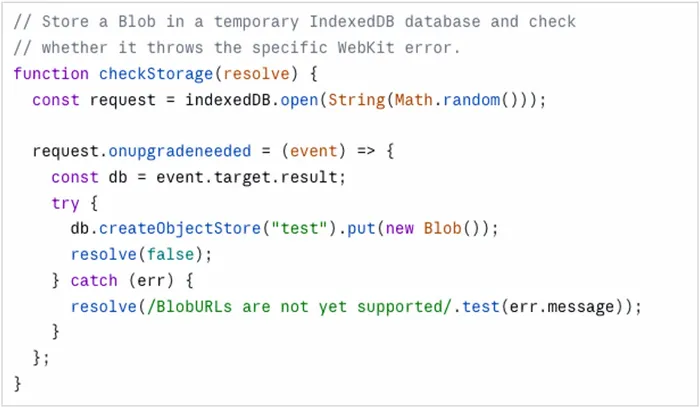
What isn't obvious from the code alone is what condition actually triggers that error. To find out, we tested it directly: we wrote a small standalone web page that tries to store a blob in IndexedDB, exactly what the kit does, and reports whether it succeeds or throws and with what message. Running it on a range of devices from iOS 11.3 to 18.3.2, on every version we tested the error appeared only in private browsing; in a normal tab the blob stored fine, while in a private tab it threw with "BlobURLs are not yet supported." That points to this check inferring private browsing indirectly, through a quirk in how WebKit handles storage.
As for why the kit bothers detecting private browsing, it fits the earlier idea that what a kit checks for shows what worries it. Someone in a private session might be more privacy-aware than the usual target, and a large-scale operation might want to flag that or avoid it. This is an assumption, not something the code proves, but it fits a kit that wants to know who it's up against before it commits.
Example 3: detecting a restricted or non-genuine browser
This check combines three signals. All three are features a normal iPhone browser has but that tend to disappear in two situations the kit cares about: a browser locked down for security or an environment that isn't a real browser at all, like an automated analysis setup.
First, it looks for WebRTC, the technology behind real-time audio and video calls in the browser. Lockdown Mode disables it, and many automated environments don't include it either, so the absence of its core objects (constructors like RTCPeerConnection) is a signal. Second, it checks for WebGL, the interface browsers use for GPU-accelerated graphics. Lockdown Mode also switches it off, and some analysis environments don't provide it. Third, it runs a rendering test. It injects a hidden MathML element and asks for it in blue, then reads back the color that actually came out. The color is just a probe: if MathML rendering works, the element comes back blue (rgb(0, 0, 255)); if it's blocked, the request is ignored and the element stays its default black.
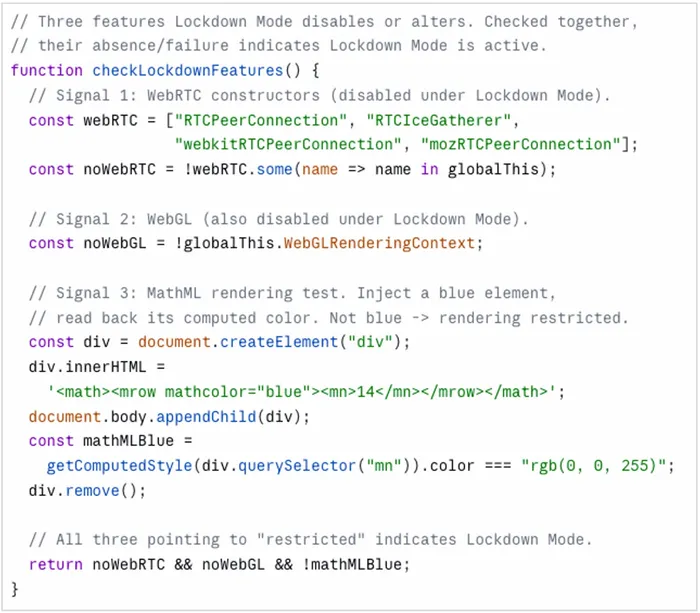
We confirmed this directly on an iPhone running iOS 17.0.2: with Lockdown Mode enabled, WebRTC and WebGL both disappeared, and the MathML element rendered black instead of blue, while with it disabled all three were present, exactly the split the kit relies on.
None of these three results is conclusive on its own. Each can be absent for more than one reason, and each has innocent explanations. But taken together —three features a genuine iPhone browser should have and that Lockdown Mode and automated environments strip away —they add up to a confident verdict.
Example 4: detecting automation
This check reads navigator.webdriver, a flag the browser sets to true when it's being driven by automation tools such as Selenium, Puppeteer or Playwright. Those tools drive a browser through code, with no human clicking or typing, the kind of setup researchers use to run samples safely. The previous examples had to infer this from missing features; here the kit just reads the flag directly. A browser running under automation is more likely to be a researcher's than a real victim's.
The same instinct in the implant: Predator's kill switch
Fingerprinting isn't only a browser-side, pre-exploit behavior. The same environment-checking instinct runs all the way through these attacks, between exploitation stages and into the implant itself. The attacks are delivered in stages, each one fetched only after the previous succeeds, which leaves natural points along the way where the kit can stop if something looks wrong.
Predator, the spyware sold by Intellexa, shows how elaborate this gets once you reach the implant. In a previous post, "Predator's kill switch: undocumented anti-analysis techniques in iOS spyware," Jamf Threat Labs reverse-engineered a Predator sample and documented an anti-analysis layer taken to an almost bureaucratic extreme.
The standout finding was an error-code taxonomy. Rather than simply quitting when it detected trouble, Predator reported a specific code back to its operators before exiting, so they'd know exactly why a deployment failed. The codes ran from 301 to 311 with several missing in between, which suggests the scheme either evolved over time or is shared across Intellexa products. The implant goes beyond a simple environmental check, reporting its findings.
These are environment checks aimed at the implant level. Predator looks for iOS Developer Mode, scans for analysis tools like network-capture utilities and instrumentation frameworks, and more. The process list even includes a common network-statistics command, which hints at concern about privacy-conscious users inspecting their own connections, not just professional analysts.
Different layer, same idea. Whether it's a web page deciding whether you're worth an exploit, a chain deciding whether to fetch its next stage or an implant deciding whether it's safe to unpack, the software sizes up its surroundings and makes a go/no-go call before it shows itself.
What fingerprinting tells us and where it's heading
The main lesson is simple: if you only study the exploit, you miss the stage that decides whether the exploit ever runs. Sometimes the kit can't know for sure whether it's on a hardened phone or in a researcher's sandbox, so it makes an educated guess from indirect signals and acts on it.
There's nothing inherently malicious about fingerprinting. The same tricks spyware uses to screen its victims are what legitimate bot-detection and fraud-prevention tools use every day to tell a real user from a bot. The difference is only what it's used for, and in the offensive world, that difference creates a real problem for anyone trying to catch these kits:
- Your test environment has to look like a real phone. These kits are made to spot the tools researchers use, like automated browsers and simulators. If your setup doesn't look like a real device, the kit stays silent, and you mark the sample as safe. So the smartest kits are the ones you're most likely to miss.
- "Nothing happened" isn't proof nothing tried. A page that stays silent because it sensed it was being watched looks exactly like a harmless one. If your detection waits to see the payload run, it will always miss the kits that are best at hiding.
For users and the people protecting them, the same logic points the other way, and it's good news: the environments an attacker avoids are the environments you want to be in. Keep devices current, since version-specific chains don't fire on software they don't target. Enable Lockdown Mode for higher-risk users, since some kits are built to abort the moment they detect it. A kit walking away at the reconnaissance stage is a win.
None of this stands still. As platforms harden, attackers find new side effects to read. As analysis environments get better at looking real, kits hunt for subtler tells. The reconnaissance arms race will keep pace with the exploitation one. It's the quietest part of the attack and the part that decides whether you're a target at all.
References
- Google Threat Analysis Group, "Buying Spying: Insights into Commercial Surveillance Vendors," February 2024
- Google Threat Intelligence Group, "Coruna: The Mysterious Journey of a Powerful iOS Exploit Kit," March 2026
- Jamf Threat Labs (Shen Yuan, Nir Avraham), "Predator's kill switch: undocumented anti-analysis techniques in iOS spyware," January 2026
- Apple, "About Lockdown Mode"
Read the latest research from Jamf Threat Labs.