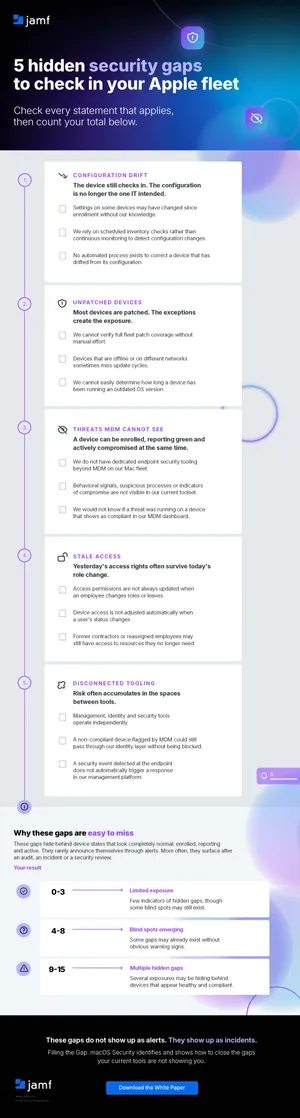
5 security gaps hiding in plain sight across your Apple fleet
Whether you’re starting from scratch or adding Apple devices to your existing tech stack, managing and securing your growing Apple fleet can be a challenge. Discover five common Mac security gaps before they turn into bigger problems.

Hello wayfaring IT admin! Are you on a journey to grow your Apple fleet? You’ve gotten your devices enrolled in MDM. But there’s a lingering thought in the back of your mind — what if I’m missing something? You’d be far from alone.
Your fears aren’t exactly unfounded, but they’re also not unfixable. Many organizations that are adding Apple to their fleet struggle with hidden macOS security risks. In this blog, we’ll talk through the first step — understanding five common security gaps.
Gap #1: Configuration drift
Configuration drift is very common. This slow, unintentional divergence from the intended configuration comes from a variety of sources. Maybe you applied a hotfix for an issue, but it got overwritten by a later update. Or a standard user was temporarily upgraded to an admin, but their privilege never got revoked. Or a lack of clear change management policies meant dependencies get missed.
As a result, devices that were once configured correctly aren’t any longer. From the admin side, the device is still checking in and reporting as expected — it’s just not meeting the latest and greatest compliance standards.
Device fleets are dynamic — software gets updated, users change roles, policies change, new licenses are deployed and so on. Without constant vigilance, macOS configuration drift is inevitable.
Gap #2: Unpatched devices hiding in a mostly patched fleet
As part of Mac patch management, you likely enforce minimum software versions to make sure devices have the latest security patches. But even with strict update deadlines, some devices fall through the cracks. This could be a device that was offline or one where the updated wasn’t fully applied for some reason.
This gap between a patch release and full implementation exposes your organization to attackers — patch notes often mention vulnerabilities that persist in older versions that attackers can exploit. If you’re tracking software versions manually by looking through a list of your devices, keeping up quickly becomes unsustainable as status constantly changes.
Gap #3: Compromised invisibly to MDM
Mobile device management (MDM) is necessary to gain visibility into your device inventory. But it is not all seeing, nor is it intended to be. Your MDM doesn’t list behavioral signals, suspicious processes or indicators of compromise. Well-designed infostealers and malware may not even violate MDM policies, running as they please.
Despite this, a device can look compliant in your MDM. Without dedicated endpoint security tools — ones that deeply understand your operating system’s behavior — these macOS threats MDM cannot detect stay invisible. Some of your fleet's most consequential exposures can live here undetected.
Gap #4: Access that has not kept pace with role changes
Least privilege access policies are crucial for security — users should only have access to resources they need to do their jobs. But people change teams, contractors finish projects, employees leave and devices get reassigned. This is a gap in Apple device management security that's easy to overlook, especially when your organization moves fast.
Without automated ways to keep up with these changes, updates to permissions fall behind. This creates stale, abandoned accounts for attackers to target or additional access points even when users don’t need the access.
Gap #5: Disconnected tooling that creates coverage blind spots
You get the most insight when your management, identity and endpoint security tools talk to each other. MDM might list a device as non-compliant, but your identity provider allows it to access resources. Or your security software detects malware on a device, but your MDM doesn’t know to act on it — exactly the situation we mentioned in Gap #3.
These Mac endpoint security gaps accumulate from this lack of communication. When tools across your system cooperate, you get more insight into the true behavior of devices, including their true compliance status.
It’s possible to close the gaps.
If you're not sure where to start checking for these gaps, take a look at our checklist, 5 hidden security gaps to check in your Apple fleet.
While these gaps aren’t inevitable, they’re natural parts of an environment that’s grown faster than the security layer around them. But thankfully, each one is closable. Our white paper, Filling the Gap: macOS Security, walks through how to identify and close these gaps — including the ones your current tools aren’t showing you.
Learn how to close common gaps in your growing Mac fleet.