
PamStealer: a Rust-based macOS infostealer that validates credentials through PAM
Jamf Threat Labs investigates PamStealer, a macOS infostealer disguised as the legitimate Maccy clipboard manager that uses a two-stage attack chain to silently harvest data and clipboard contents while evading detection.

By Thijs Xhaflaire
Introduction
While reviewing results from our sample pipeline, Jamf Threat Labs identified a macOS infostealer distributed as a compiled AppleScript (.scpt) file impersonating “Maccy,” a legitimate open-source clipboard manager. We are tracking this malware under the name PamStealer after one of its core behaviors: validating the victim’s login password through the macOS Pluggable Authentication Modules (PAM) before harvesting it.
PamStealer is delivered in two stages. The first is a compiled AppleScript distributed inside a disk image that downloads and stages a second-stage payload. The second is a Rust-based Mach-O infostealer responsible for credential theft, browser data collection, persistence and exfiltration. The dropper is hosted on the fake domain maccyapp[.]com, which impersonates the legitimate Maccy project.
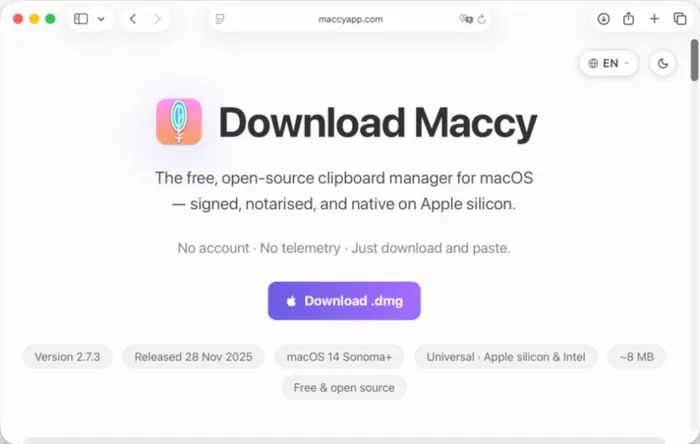
Although disk images and AppleScript-based malware are well-established on macOS, PamStealer combines them in an interesting way. Rather than relying on shell commands such as curl or zsh, the AppleScript executes a self-contained JavaScript for Automation (JXA) downloader that retrieves and stages the payload using native Objective-C APIs. Combined with a Rust-based second stage and a password capture workflow that validates credentials locally through PAM, the result is a quieter execution chain than we typically observe in commodity macOS stealers.
Throughout this post, we examine PamStealer in two stages: the AppleScript dropper and the Rust stealer, and highlight the behaviors that are most relevant from a defender’s perspective.
The lure: a "Maccy" clipboard manager distributed through a disk image
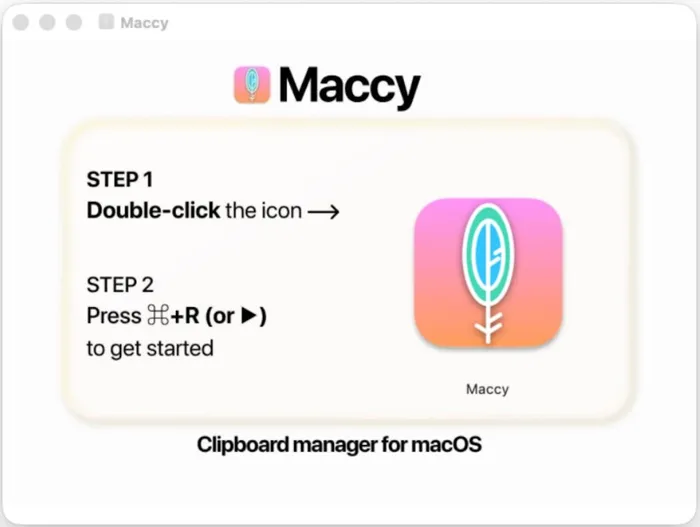
The sample arrives as a file named Maccy.scpt, distributed on a disk image and dressed up as an app for the Maccy clipboard manager. By design, macOS opens a .scpt file in Script Editor when it is double-clicked. The attacker leans on this: the visible content of the document is a short, branded set of instructions, while the real logic sits far down the file behind a large block of empty lines.
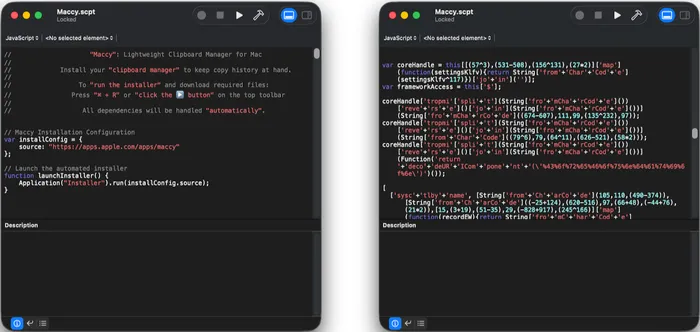
The instruction to press ⌘+R (or click the ▶ Run button) is the entire social-engineering payload. Running the script in Script Editor executes the embedded code directly. Notably, this works even when the file still carries the com.apple.quarantine attribute, which is what makes the approach attractive to attackers as Apple continues to tighten Gatekeeper and Terminal.
One deliberate detail: in the word "Maccy," the lure text uses homoglyphs, Greek and Cyrillic characters that look identical to their Latin counterparts. The displayed lure is indistinguishable to a human reader, while the swapped characters frustrate simple matching on the decoy text.
Stage one: the AppleScript dropper
The compiled AppleScript is a thin wrapper around a JXA payload. Although the JXA is obfuscated to slow analysis, its behavior is straightforward: it downloads, stages and launches the second-stage payload using native macOS APIs. Unlike many AppleScript-based downloaders that invoke utilities such as curl, osascript or zsh, the dropper performs these actions directly through NSURLSession and the Objective-C bridge. This reduces visible process creation during execution and leaves fewer behavioral artifacts for defenders to key on.
Environment-aware execution
Rather than carrying its configuration in cleartext, the dropper derives a key from a fingerprint of the host (CPU architecture, locale, keyboard layout and time zone) and uses it to unlock an encrypted, integrity-checked configuration that holds the payload URL and install path. The configuration only unlocks on a valid target. In the samples we analyzed it was keyed to Apple silicon; on an Intel host the derived key differs, the configuration fails to unlock and the dropper silently terminates.
Region-based exclusion
Before proceeding, the script checks the host against an exclusion list using three independent signals: the system time zone (against a set including Europe/Moscow, Europe/Minsk and Asia/Almaty), the country code and identifier from the system locale (RU, BY, KZ, AM, AZ, KG, MD, TJ, UZ, TM, GE), and the active keyboard input sources (against Russian, Belarusian, Kazakh and other regional layouts). Because these checks feed the key derivation, a match in any of them quietly prevents the configuration from unlocking.
Anti-analysis awareness
The dropper includes anti-debugging checks and inspects the System Integrity Protection status. Combined with the environment-keyed configuration, this is consistent with avoiding execution in sandboxed or analysis environments.
Download and staging
When the checks pass, the script requests the payload over NSURLSession and writes it to disk only on a successful response with a non-empty body. It runs a quick check first and exits if the payload is already present. The retrieved Mach-O is written as executable.
Masquerading as a system app
The dropper stages the payload inside an application bundle that impersonates a built-in macOS component. Across the samples we observed, the bundle and identifiers varied, for example a Finder.app under com.apple.finder.core or com.apple.finder.monitor, and a Software Update.app under com.apple.security.daemon, each set up to run hidden, with the genuine Finder.icns copied in as the icon.
Ad-hoc signing and a hidden launch
Before launching, the script ad-hoc signs the bundle (codesign -fs - --deep), notably not a Developer ID signature, and launches it hidden, with no window or Dock presence. It drops a marker file (.Maccy) alongside the staged bundle to track infection. The dropper itself steals nothing; it is purely a stager.
Across the observed variants we analyzed, everything cosmetic (names, the encrypted configuration and the values behind the obfuscation) changed from build to build, pointing to an automated builder rather than hand-editing. The behaviors above, the region lists and the homoglyph lure stayed constant.
Stage two: the Rust infostealer
The second stage is a stripped, arm64 (Apple silicon) Mach-O written in Rust, confirmed by toolchain artifacts left in the binary; across the samples we analyzed, we have not seen an x86_64 build. Rust remains comparatively uncommon in the macOS stealer ecosystem, where Swift, Go and Objective-C dominate. Most of its strings are decoded at runtime, so the readable surface is mostly limited to the libraries it loads and the Objective-C methods it calls.
Credential database theft
The binary bundles SQLite and calls its read interface, so it opens and reads database files directly. The specific paths are decrypted at runtime and did not surface in static analysis, but this is the standard mechanism for pulling data from browser credential, cookie and wallet-extension databases.
Keychain access through a runtime-loaded framework
Rather than linking Security.framework directly, the stealer loads it at runtime. This keeps its keychain-access capability out of the binary's static import table, reducing what an analyst or tool sees up front.
Clipboard theft
The stealer reads the clipboard, and as confirmed during dynamic analysis it does so by spawning the built-in pbpaste utility.
Exfiltration
The binary builds outbound HTTP requests to its command-and-control endpoint. A distinctive build marker, MacOSapp1{"data":""}, appears alongside the data it sends. In captured traffic, that data is encrypted with ChaCha20-Poly1305 and wrapped in a {"data":"..."} JSON envelope. During dynamic analysis we recovered the encryption key from process memory and decrypted a configuration object the server returns, which is covered in the command-and-control section below.
PAM-validated password capture with no shelling out
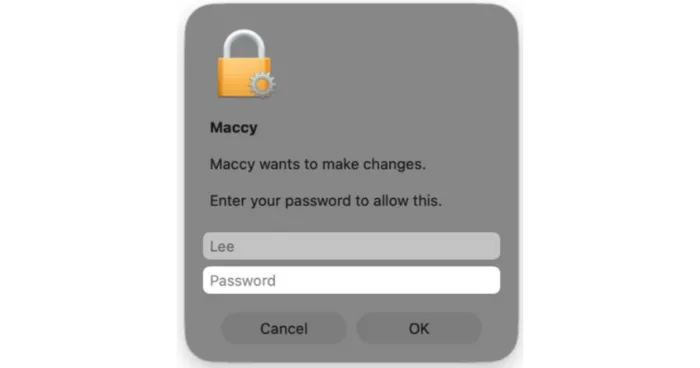
The behavior that gives PamStealer its name is how it captures the login password. As part of its run, it shows a native password prompt, an NSAlert with a secure text field made to resemble a system authorization request: the dialog is titled after the lure and reads "Maccy wants to make changes. Enter your password to allow this," with the account name pre-filled. It then validates what the victim types locally through the PAM API (pam_start, pam_authenticate, pam_end), supplying the entered password when PAM asks for it. If validation fails, it re-focuses the field and prompts again, only continuing once the password is confirmed correct. This check is done entirely through PAM: there is no call out to dscl, security, osascript or any spawned process to verify the password, as many commodity macOS stealers do. The result is a quieter routine that keeps only a verified password, and one fewer process chain for defenders to detect on.
Login item persistence
PamStealer keeps its Finder.app bundle running across logins by registering it as a login item, and it does so two ways: directly through the modern ServiceManagement API (SMAppService), and through a small helper it writes to /tmp and executes, which adds the bundle to the legacy login items list. The helper is examined below.
Coercing full disk access
Beyond the files it can already read, the stealer tries to widen its reach by tricking the victim into granting full disk access. It does this with a counterfeit system alert rather than any privilege escalation; because macOS does not let an app grant itself this permission, the prompt is purely social engineering. What the victim sees, and where it leads, is shown in the behavior section below.
The second stage repeats the same host-fingerprint and regional awareness seen in the dropper, reinforcing that both stages come from the same operator.
Behavior on an infected host
We detonated the sample in a sandboxed environment and captured the activity. The observed execution chain matches the static analysis and fills in the on-disk detail.
When the victim runs the script, Script Editor itself carries out the staging. It creates the fake bundle under ~/Library/Application Support/com.apple.finder.core/Finder.app, writes the downloaded Mach-O to Contents/MacOS/77617EA0 using a temporary file that it renames into place, and sets its permissions to 0755 with an internall call to chmod() rather than by spawning the chmod command. It writes the Info.plist, copies in AppIcon.icns, drops the marker file .Maccy next to the bundle, and then spawns codesign -fs - --deep (by way of sh and bash) to ad-hoc sign the bundle. Because the JXA performs its download through NSURLSession from inside Script Editor, the request is cached under ~/Library/Caches/com.apple.ScriptEditor2/. Script Editor can make network requests legitimately, so this is not suspicious on its own, but it is uncommon on most endpoints and a useful signal alongside the staging activity that follows.
Script Editor then launches the signed bundle. Running as the fake Finder, the second stage creates two files next to its bundle: a .lock, and a .config that stores its command-and-control URL, https://avenger-sync[.]live/api/sync, in cleartext. It stands up its own caches under ~/Library/Caches/com.apple.finder.core/ and ~/Library/HTTPStorages/com.apple.finder.core/. A short time later it begins reading the clipboard, spawning pbpaste repeatedly rather than once. Across our monitoring these reads recurred at irregular intervals, from under 10 seconds to roughly a minute and a half apart and most often around 10 to 30 seconds, which points to ongoing clipboard capture rather than a one-time snapshot. Two behaviors here are worth flagging for detection: Script Editor spawning codesign against a bundle inside Application Support, and a process posing as Finder, running from Application Support, repeatedly spawning pbpaste.
On-screen prompts and a decoy
On a machine with an interactive session, running the sample produces two dialogs in sequence. The first is the password prompt described earlier, styled to look like a genuine macOS authorization request. It is titled after the lure and reads "Maccy wants to make changes. Enter your password to allow this," with the account name already filled in. Because the stealer checks the entry through PAM, an incorrect password simply re-prompts until a valid one is supplied.
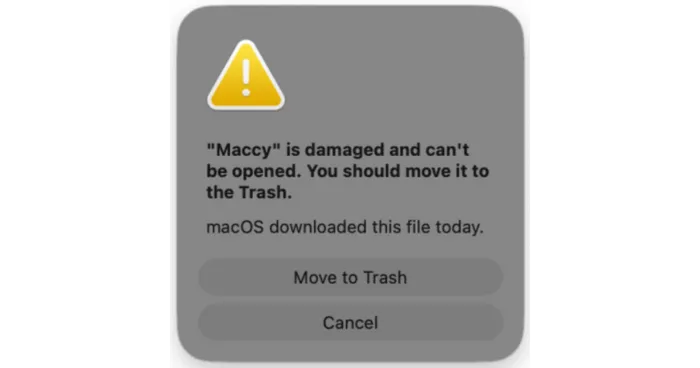
Once a valid password is captured, the stealer shows a second, counterfeit alert: "'Maccy' is damaged and can't be opened. You should move it to the Trash," a close copy of the genuine Gatekeeper message. This is a decoy. By the time it appears the payload has already run, captured the password and registered for persistence, so the message serves only to make the victim discard the lure and assume the download was broken. Worth noting, the decoy is shown by the second-stage stealer itself, not by the dropper or by macOS.
A push for full disk access
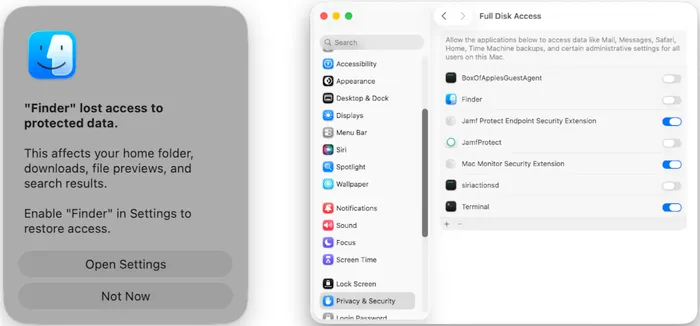
The stealer also makes a play for broader file access. It displays a counterfeit system alert, styled with the Finder icon, claiming that "Finder" has lost access to protected data and offering an Open Settings button. This alert does not appear at launch. In our testing it surfaced only after a delay, sometimes as long as forty minutes, and the interval varied from run to run rather than following a fixed schedule. The wait makes the prompt harder to connect to the app the victim just opened, and it means the absence of an immediate alert is no assurance the host is clean. Clicking Open Settings opens System Settings straight at the Full Disk Access pane, where the malicious bundle, named Finder.app and carrying the genuine Finder icon, appears in the list simply as "Finder." If the victim enables it, the stealer gains full disk access and can read protected locations across the system, such as other applications' data, Mail, Messages and Time Machine backups, without any further prompts. macOS does not let an app grant itself this permission, so the entire sequence is social engineering.
An embedded helper for login item persistence
The second stage does more than run in place; it carries a second executable inside itself. Baked into the Rust binary is a small arm64 Mach-O, roughly 34 KB, that the stealer writes verbatim to /private/tmp/System Settings, sets executable with a chmod() call, and then launches by forking and executing it, passing the path to its own Finder.app bundle as an argument (for example, /tmp/System Settings /Users//Library/Application Support/com.apple.finder.core/Finder.app). The payload is embedded rather than downloaded.
The dropped helper is a compact, ad-hoc signed program that impersonates macOS System Settings, and its purpose is persistence. It takes the bundle path it was handed, builds a file URL from it, and adds the malicious Finder.app to the current user's login items through the legacy shared file list API (LSSharedFileListInsertItemURL against kLSSharedFileListSessionLoginItems), first walking the existing entries and comparing paths so that it does not register itself twice. The effect is that the fake Finder relaunches automatically at every login. This is a second, redundant persistence path: the Rust stealer separately registers the same bundle for launch at login through the modern ServiceManagement API (SMAppService), so the malware establishes login item persistence through both the current and the legacy macOS interfaces.
A revealing cache
The most useful artifact the second stage leaves behind is its own network cache. Under ~/Library/Caches/com.apple.finder.core/, the Cache.db file (a standard NSURLCache store, alongside its Cache.db-wal and Cache.db-shm companions) retained the stealer's command-and-control exchange in full: a POST to https://avenger-sync[.]live/api/sync, fronted by Cloudflare, with both the request and the response written to disk. The cache metadata is stored in cleartext, which confirms the endpoint, the POST method, the application/json content type and a stock CFNetwork user agent rather than a custom one. The message bodies, however, are each wrapped in a {"data":"..."} JSON envelope whose contents are encrypted, so what the cache preserves at rest is ciphertext.
The encryption is ChaCha20-Poly1305. Notably, the stealer derives its keys at runtime and does not persist them, and we observed distinct keys in use within a single run, so the cached exchange on disk cannot be decrypted after the fact from the cache alone. To read the traffic we attached a debugger to a running instance and recovered a live key directly from the process at the point the cipher was invoked, then decrypted the associated message.
Two things stand out. First, this exfiltration endpoint (avenger-sync[.]live) is distinct from the URL the dropper used to fetch the payload, and its naming aligns with the avngr (avenger) delivery domain seen across the sample set. Second, because the cache writes this exchange to disk, it gives responders a reliable place to confirm both the contact and the channel after the fact, even though the contents are encrypted.
A decrypted configuration and calls to Ethereum endpoints
With a live key in hand we decrypted one of the objects the server returns, a configuration the stealer identifies internally as avenger-config-v2. Among its keys were two public Ethereum JSON-RPC endpoints, eth.drpc.org and ethereum-rpc.publicnode[.]com.
These are not just config entries. On an infected host, a firewall recorded the second-stage process, running as "Finder," connecting to ethereum-rpc.publicnode[.]com, one of the endpoints from that configuration, so PamStealer reaches this infrastructure in practice rather than merely carrying the addresses. We did not capture the specific calls, so the purpose is still open: reaching a blockchain RPC node fits both resilient command-and-control, where a value read from the chain points to the next stage, and reconnaissance against the cryptocurrency wallets this stealer already targets.
Conclusion
PamStealer combines a recently emerging delivery surface with a less familiar payload. While the clickable .scpt and Script Editor lure build on tradecraft that is already gaining adoption across the macOS threat landscape, the malware distinguishes itself through a self-contained JXA dropper, a Rust-based second stage, and a password capture workflow that validates credentials locally through PAM before harvesting them. That second stage puts considerable effort into staying hidden, masquerading as Finder, encrypting its command-and-control traffic, and holding back prompts like the Full Disk Access request for as long as forty minutes so its activity does not line up with launch. Together, these behaviors illustrate how commodity macOS stealers continue to evolve, adopting quieter execution chains and native implementations that reduce traditional detection opportunities while remaining compatible with standard macOS features.
Jamf Threat Labs continues to monitor this activity and track related infrastructure and variants. In Jamf for Mac, customers can configure threat prevention, advanced threat controls and web protection to Block and Report to help prevent the execution of similar threats.
Indicators of compromise
Read the latest research from Jamf Threat Labs.