AmnesiaStealer: a multi-stage Rust-based macOS infostealer that hijacks Chromium browsers
Jamf Threat Labs discovers and investigates AmnesiaStealer, a multi-stage Rust-based macOS infostealer spread through a counterfeit GitHub download page that captures the login password, reaches for macOS bypasses Apple has already patched, and can hand the operator live, hidden control of the victim's Chromium browser to steal authenticated sessions.
By Thijs Xhaflaire
Introduction
Jamf Threat Labs has discovered a new multi-stage macOS infostealer distributed through ClickFix: a counterfeit GitHub "Download for macOS" page that lures the visitor into pasting a command into Terminal, which quietly pulls down and launches a payload. This malware has been seen in the wild and we track it under the name AmnesiaStealer, after the Amnesia Panel backend it reports to. The same name appears in the key that decrypts its embedded configuration, 4mn3s1a_2o26!xK.
AmnesiaStealer runs in three stages:
- The first is a shell script that downloads and launches the payload.
- The second is a Rust infostealer that harvests the keychain, browsers, Apple Notes and Telegram.
- The third is a
stream_module, fetched on command, that gives the operator hidden, interactive control of the victim's browser.
Its objectives overlap with families such as Atomic (AMOS), MacSync and CrashStealer. Three traits set it apart: a builder-driven configuration, OS version-branched logic that reaches for patched macOS bypasses, and the remote-control second stage.
Throughout this post, we examine AmnesiaStealer as we observed it and highlight the behaviors that are worth looking into.
Table of contents:
- The lure: a counterfeit GitHub download page
- Stage 0: the dropper script
- Stage 1: the Rust-based infostealer with OS-specific capabilities
- Execution flow
- Stage 2: the Rust-based streaming module with hidden browser control
- Driving it in the lab
- Related infrastructure and earlier builds
- Conclusion
- Indicators of compromise
The lure: a counterfeit GitHub download page
The landing page at hxxps://github.aoitour[.]com reproduces GitHub's dark theme, the Octocat mark and a "Verified Publisher" badge next to a "Download for macOS" heading. Rather than offering a download, it presents a "Terminal installation" box framed as a convenience for advanced users, with a one-click Copy button and numbered instructions to open Terminal through Spotlight, paste, press Return and, at step three, "Enter your device password and confirm the installation." The same counterfeit GitHub page has also been observed in Atomic (AMOS) and MacSync stealer campaigns, so the lure template is shared across families rather than unique to AmnesiaStealer.
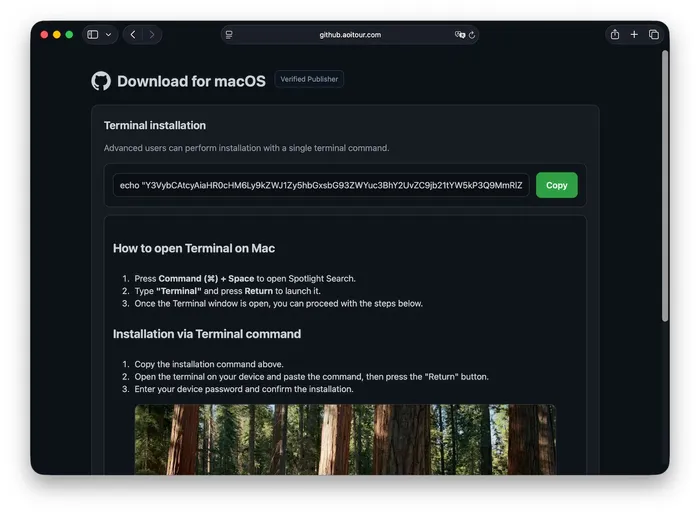
Clicking the copy button yields a base64 blob that decodes to a single command:
The b=se parameter matches the BUILD_ID value inside the payload's encrypted configuration, and t= carries a token used to identify the request back to the panel. Both are per-build values written by the panel into the loader and the Mach-O alike, which points to a builder rather than hand-assembled samples.
Stage 0: the dropper script
The script retrieved from /d/command is short, silent and self-deleting:
Several details are worth looking deeper into.
The archive is protected with the password dulin, which defeats automated unpacking and inline inspection of the ZIP. The numeric token is generated fresh every time the script is fetched from the infrastructure: each retrieval uses a randomly generated number (88811 seen above), which names both files the script touches. The ZIP downloads to /tmp/, and the payload extracted from it is renamed to /tmp/.com.apple.dt.88811: the Stage 1 Mach-O, relocated under a hidden, Apple-looking filename.
The archive can contain either macos-hybrid-stealer or macos-hybrid-stealer-universal, and the loader accepts whichever is present. The binary we analyzed contains a (FAT) Mach-O binary which we cover below in Stage 1
Before the binary is executed through nohup, gatekeeper handling is done in the commonly seen three steps: chmod +xmakes the binary executable, codesign --force --deep --sign - applies an ad-hoc signature and xattr -cr strips the quarantine attribute.
Stage 1: the Rust-based infostealer with OS-specific capabilities
The payload is a stripped Rust universal (FAT) Mach-O binary, with SHA-256 de5748aac4a4d4cb48cf050652679e6bc49eda33d9ffaa0d280b578122fab55a.
The binary retains its Rust .cargo build paths, which leak the developer's home directory as /Users/admin/.cargo/ alongside project-relative strings target/release, dump_mail, run_controller and /tmp/mail_accounts_smoke. The author also shipped an extensive debug-logging framework in the release build. Every message carries the prefix [HYBRID_DEBUG], and those messages document the malware's decision tree.
The embedded encrypted configuration
The command-and-control (C2) endpoints are not present in cleartext. Configuration lives in a 4,064-byte blob decrypted with a repeating 15-byte XOR key, laid out as a KEY\0VALUE\0 table and searched linearly at runtime. The builder brackets it with plaintext markers so it can locate and patch the region per build:
Decrypting with 4mn3s1a_2o26!xK recovers the campaign configuration in full:
The configuration also contains a clipboard-hijacking (clipper) module covering ten cryptocurrency asset classes, compiled in but disabled with empty addresses in this build.
An embedded AppleScript stage
A second XOR blob, using the same key, decrypts to a single AppleScript source file. These two blobs are the entirety of the encrypted content in the binary.
The script's first action is to mute the host:
The volume is restored with set volume without output muted. The mute sits at the start and the unmute at the end because part of the collection runs through Finder, which plays a sound on each file it duplicates; silencing the host keeps the activity inaudible.
The script first takes Apple Notes (NoteStore.sqlite with its -shm and -wal companions) and Telegram session data using do shell script with cat and cp, which execute as the malware's process. The author marks these as the quiet path, chosen to avoid raising a TCC prompt:
The script first takes Apple Notes (NoteStore.sqlite with its -shm and -wal companions) and Telegram session data using catand cp. The author's comment marks these steps as the silent approach, chosen to avoid triggering a macOS permission (TCC) prompt:
Only then does the script open a tell application "Finder" block. It creates ~/tempFolder-32555443/ with its FileGrabber, Notes and NotesMedia subfolders, then uses Finder's duplicate command for the remaining items: Safari cookies, a Notes duplicate retry for anything cat missed, Notes attachments under a hard 12 MB cumulative cap, Safari's Form Values file, and finally the whole ~/Library/Keychains/<hardware UUID> folder resolved through system_profiler:
Because duplicate makes Finder the process that reads each file, these steps access data the malware cannot directly reach without prompting the user. The Safari cookie step tries cat first and falls back to duplicate only when that fails.
The Telegram routine reflects specific knowledge of the application's layout rather than a blind directory copy. It copies tdata/key_datas, then enumerates the directory and copies every entry ending in s, which are the account directories, while explicitly skipping emoji, emodji and user_data:
Execution flow
We detonated the sample in a sandboxed environment and captured the activity through dynamic analysis. The following captures the full observed execution chain across both stages during dynamic analysis:
The captured chain performs the following actions:
- Clears the quarantine attribute from its own path and confirms it is the only running instance
- Profiles the host: hardware identifiers, macOS version, installed applications and public IP geolocation
- Prompts for the login password through a native Installer-style alert and validates it locally with
dscl - Unlocks and copies the login and data-protection keychains
- Collects Chromium databases, Apple Notes and documents; destructively rewrites the Chrome Safe Storage key if browser-key recovery returns nothing on macOS 26
- Attempts two TCC bypasses: an APFS local-snapshot mount to reach Safari cookies, and a Full Disk Access grant injected into
TCC.db; both fail on macOS 26 - Archives the staging directory with
dittoand exfiltrates to the C2 endpoint - Installs a LaunchDaemon for persistence, polls for tasking and clears its own artifacts
- Once the
remote_streamcommand is received from the panel, fetches and launches the Stage 2 stream module - The stream module clones the victim's browser profile, launches it headless and gives the operator live, hidden control of the session
Quarantine self-removal
Before anything else, the payload runs xattr -d com.apple.quarantine against its own path, duplicating the loader's earlier xattr -cr. It then confirms it is the sole instance with sh -c pgrep -f '/tmp/.com.apple.dt.80347' | grep -v <pid> | head -1.
Host and geolocation profiling
Reconnaissance is performed with standard tooling: sw_vers -productVersion, whoami, ioreg -rd1 -c IOPlatformExpertDevice for the platform UUID and serial number, system_profiler across the software, hardware and display data types, and ls -1 /Applications. The results are written to system_info.json in the staging directory, together with an ip_info block populated from an external IP geolocation API carrying the public IP, ASN and ISP, city, region, country, coordinates and timezone. So the panel learns the victim's location from the payload itself rather than inferring it from the callback's source IP.
The application inventory is a plaintext listing of the contents of /Applications, written to installed_apps.txt and installed_software.txt in the staging directory and exfiltrated with the rest of the collection.
A native password prompt and local validation
The password prompt is a native AppKit NSAlert, dispatched to the main queue. It is not the AppleScript display dialogtypical of commodity macOS stealers, and the title and body come from the encrypted configuration: "Installer" and "Installer wants to make changes. Enter your password to allow this." Also a legitimate looking Dock icon is showing up that mimics System Settings.
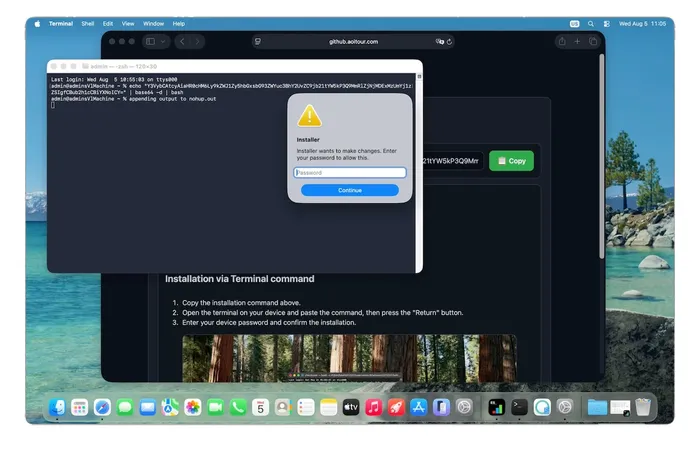
The password is validated locally with dscl and on failure it presents the alert with "Incorrect password. Please try again."
A fallback path writes /tmp/tempAppleScript.scpt and invokes osascript if the native alert fails, though on our host the native path succeeded and no osascript prompt was raised.
The captured password is then reused throughout the chain. It is piped into sudo -S for privileged reads, passed to security unlock-keychain -p, and written to disk in cleartext, both in the staging directory as pwd and in the user's home directory as ~/.pwd.
Keychain unlock and collection scope
With the password in hand the malware runs security unlock-keychain -p <password> ~/Library/Keychains/login.keychain-db and calls SecKeychainSetUserInteractionAllowed(false) (deprecated Keychain API) to suppress interactive prompts. The keychain collection succeeded through ordinary file access, with no bypass involved. The malware copied keychain-2.db with its -waland -shm companions, user.kb, and two copies of login.keychain-db. keychain-2.db and user.kb are the data-protection keychain files that hold encrypted records, and at the time of analysis it is unclear why they are collected.
Apple Notes was read with echo '<password>' | sudo -S cat against NoteStore.sqlite and its -wal and -shm companions, staged through /tmp/_notes_tmp_NoteStore.sqlite*. The document sweep targets ~/Desktop, ~/Documents and ~/Downloads, filtering on the extensions txt, pdf, rtf, doc, wallet, key, jpg, png and csv.
Wallet collection is generic rather than list driven. The binary contains no hardcoded extension identifiers and no desktop wallet bundle names. Instead it enumerates Local Extension Settings, Extensions and IndexedDB per browser profile and pattern matches, logging counts for extension wallets and IndexedDB wallet extensions. That approach is noisier than the fixed-identifier model most families use, but it captures newly released wallet extensions without a builder update.
Chromium collection and a destructive Safe Storage rewrite
Sixteen Chromium-family browsers are targeted including Chrome, Brave, Arc and Edge. Per profile, across Default and Profile 1 through Profile 3, it copies Cookies, Login Data, Login Data For Account, Web Data, History, Bookmarks, Local State, Preferencesand the Extensions directory.
Master key recovery reads the per-browser Safe Storage generic password from the login keychain. Recovered values are cached to ~/.local/share/.stream/.<browser>_key for later use by the Stage 2 (stream) module.
This rewrite is a fallback, not the default. It fires only on macOS 26 and later, and only when key recovery has returned nothing, gated behind the author's log line macOS 26+: no keys recovered, attempting provision fallback (destructive). When that branch is reached, the malware rewrites the keychain entry with a value it already knows, using the security command line:
pqz8N3vKxRmY2aLcQ is a hardcoded attacker-chosen Safe Storage password, and EQHXZ8M8AV is Google's Team ID, included to keep the ACL partition list valid so subsequent reads do not prompt. The author's debug string labels this path provision fallback (destructive), which is accurate: overwriting the key renders previously saved passwords and cookies permanently undecryptable. The malware accepts that loss: unable to recover the existing key on macOS 26, it swaps the victim's saved data for a key the operator already knows, so anything encrypted afterward can be decrypted operator-side.
The same pqz8N3vKxRmY2aLcQ password reappears in the Stage 2 stream module, which re-encrypts a cloned copy of the profile's cookie database with it (see "Stage 2" below). The provisioning here and the re-encryption there are two halves of one scheme: pin the Safe Storage key to a value the operator already knows, so the exfiltrated profile can be decrypted on their side.
This sequence is a high-value detection. Browsers create Safe Storage entries through the Security framework and never through the security binary, so a process deleting and rewriting one has no benign explanation.
On a macOS 26 VM with a freshly installed Google Chrome profile (a couple of cookies, one saved password), collection succeeded at the file level: the malware copied each profile's Cookies, Login Data, Web Data, History, Local State and related databases into the staging tree. The Chromium credential databases are encrypted at rest with a key held in the login keychain.
Recycling a patched APFS snapshot bypass for Safari cookies
Which technique the module uses to steal Safari cookies depends on the macOS version. The code implements a four-tier ladder, each tier logged by the author's debug framework: a direct read, Finder duplication through osascript (staged at /tmp/_sc_finder_tmp), sudo cat, and finally an APFS local-snapshot mount. On macOS 26, where we captured this sample, the first three are gated off and the module goes straight to the snapshot mount. On earlier macOS versions, the snapshot tier is never reached, so a detonation on, for example, macOS 15 (Sequoia) shows none of the tmutil and mount_apfs activity below.
The snapshot tier reuses CVE-2020-9771, the mount_apfs TCC bypass Csaba Fitzl published in 2020. We observed it running twice, once for Safari's cookies and once for the TCC database:
The reuse is only partial, and the difference is one mount flag. The original proof of concept mounted the snapshot with -o noowners, which makes every file appear owned by the calling user and so exposes other users' protected data with no privileges at all, even as Guest. AmnesiaStealer uses -o nobrowse, which only hides the mount from Finder and Disk Utility, and it needs root through the phished password to run at all. As far as we can tell, it borrows the technique for concealment, not for the privilege bypass that made the original dangerous.
It fails on macOS 26 because of Apple's original fix. Catalina 10.15.4 and 10.15.5 tied snapshot access to Full Disk Access, and root does not implicitly hold that grant. In the capture, both mount points were created and mount_apfs ran twice, but no cookie data followed: there is no reference anywhere to Cookies.binarycookies, /tmp/safari_cookies* or /tmp/_sc_finder_tmp, and the staged Browsers/Safari_Default/Cookies directory is empty. None of the four tiers produced a file.
Running the same sequence by hand on macOS 26 from a Terminal that already held Full Disk Access, the snapshot mounted and both Cookies.binarycookies and TCC.db were readable straight out of /tmp/.snap_read:
The technique therefore still works on macOS 26 and later, but only when the process behind the read holds Full Disk Access, which is likely why the malware reaches for it. macOS evaluates that access against the responsible process, so the read succeeds in two cases: when the malware runs under a Terminal that holds Full Disk Access or when the malware process holds it directly. Otherwise it returns nothing. Our assumption is that the workaround pays off mainly against power users and developers, who are more likely to have already granted Full Disk Access; on most systems it fails.
TCC.db injection and its own precondition
The Full Disk Access precondition explains the malware's other attempted TCC bypass technique. Having mounted a second snapshot at /tmp/.snap_tcc to obtain a copy of the TCC database, it attempts to insert a grant for itself using sqlite3:
A second row hardcodes the client as /bin/cat, so the malware can then read any protected file through it. Working copies are staged at /tmp/.tcc_mod.db and /tmp/.tcc_bak.db, and the modified database is intended to replace the live one, with tccdrestarted through echo '<password>' | sudo -S killall tccd.
The two techniques are therefore two halves of one plan: inject a Full Disk Access grant, then use the snapshot mount that the grant unlocks. Both were closed years ago. The author's debug strings record the failure, logging TCC inject: replace TCC.db failed (kernel protection) followed by original TCC.db restored, and on macOS 26 the path is version gated off entirely.
The version gating is explicit in the strings, and the author documents Apple's hardening in their own words: macOS 26+: Safari container fully protected by TCC. Even root/sudo/LaunchDaemon cannot read. Finder/osascript methods skipped.
Staging, encryption and exfiltration
Collected data is staged in a directory named with 25 random alphanumeric characters under /tmp, then archived:
The staging tree separates Browsers, Passwords, Wallets, Notes, Telegram and FileGrabber, alongside system_info.json, installed_apps.txt, collection_report.txt, the cleartext pwd file and a Diagnostics directory containing eight of the author's debug artifacts. A BUILD_V3_MARKER.txt file records the build variant, v3_shell_chrome.
Exfiltration is authenticated with the header X-API-Key: 86770e8759abf2dad9ae85f5e11a25e9 from the encrypted configuration. Registration posts to /api/bot/join, tasking is polled from /api/bot/actions?build_id=se&bot_id=<id>, and collected data is uploaded to /send/. The ENCRYPTION_KEY value present in the configuration, together with the aes and hmac crates, indicates payload encryption before upload.
Persistence as a crash reporter agent
Persistence is a root LaunchDaemon impersonating Apple crash reporting. The plist is written to /tmp/starter, then installed and bootstrapped with the phished password:
The plist sets KeepAlive, RunAtLoad and SessionCreate, and overrides UserName to the console user.
Anti-forensics closes the chain. The malware runs sh -c history -c, removes its temporary artifacts and deletes its own binary.
Stage 2: the Rust-based streaming module with hidden browser control
The remote_stream command tells Stage 1 to fetch and run a second binary from the C2 infrastructure. It was served over an unauthenticated GET with no token required, which is how we retrieved it directly for analysis:
The binary is a Rust-based universal (FAT) Mach-O, SHA-256 e853748ca8f9a5a9168263617409a9039ab09f4ffc7d860374c1e3b0b67b31a5. Its internal crate name is stream_module, with source files src/main.rs, src/relay.rs, src/cdp.rs, src/chrome.rs and src/cookies.rs retained in the binary.
This stage is an interactive remote-control component built around the Chrome DevTools Protocol (CDP). Its C2 address is not hardcoded; it reads a STREAM_PAYLOAD environment variable set by the parent at launch, which supplies the operator relay endpoint.
The module supports seven Chromium-family browsers: Chrome, Brave, Microsoft Edge, Arc, Opera, Vivaldi and Chromium. One implementation covers all of them because they are Chromium forks that share the same DevTools Protocol, launch flags and cookie encryption. Only the executable path and profile location change per browser.
Headless control of the victim's profile
The module launches the real browser executable from the table with --headless=old, --remote-debugging-port=, --remote-allow-origins=* and a long list of hardening-off flags. Before launch it clones the victim profile through stream_module::chrome into ~/.local/share/.stream/profiles/<browser>, copying Cookies, Login Data, Login Data For Account, Preferences, Secure Preferences, Local Storage, Session Storage, IndexedDB and Local State, then points --user-data-dir at the clone. Running the victim's logged-in profile makes the rest work. Because it launches headless against a copy, the victim's own visible browser is never touched and shows nothing.
Two WebSockets
A relay channel connects out to the operator at ws://<relay-host>/ws/stream/<build_id>?t=<token> (the relay URL from STREAM_PAYLOAD, with its http(s) scheme rewritten to ws(s)), and immediately sends a JSON registration frame, {"type":"register","build_id":"…","browser":"…"}. Operator commands arrive on this channel as internally-tagged JSON ({"type":"navigate","url":"…"}, {"type":"mouse_click","x":…,"y":…,"button":"…"}, {"type":"export_cookies"}, and so on), and the module reports state back with {"type":"status",…} and {"type":"tabs",[…]} messages plus the screencast frames as binary WebSocket frames. A second CDP channel connects to the local headless browser, discovered through its webSocketDebuggerUrl.
Driving it in the lab
The module does nothing on its own; without an operator relay issuing commands it registers, waits and idles. To exercise it safely we reverse-engineered its WebSocket relay protocol from the binary (the STREAM_PAYLOAD config format, the registration frame and the internally-tagged command schema above) and wrote a small proof-of-concept relay that impersonates the operator's control server. Running that relay in an isolated VM, we set STREAM_PAYLOAD to point the module at it, let the module register, and then issued commands from our relay exactly as the real panel would. Everything described below was observed this way, driving our own copy of the module against a throwaway Chrome profile.
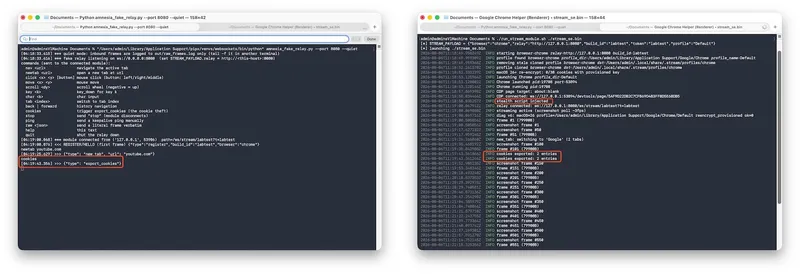
Live screen and full remote input
The operator receives a live screencast of the session at around 3fps and can drive it with a full input set: keyboard, mouse, scroll, navigation and tab management. These are translated into CDP calls against the headless browser in real time. This is a hands-on-keyboard hidden browser session, not an automated dump.
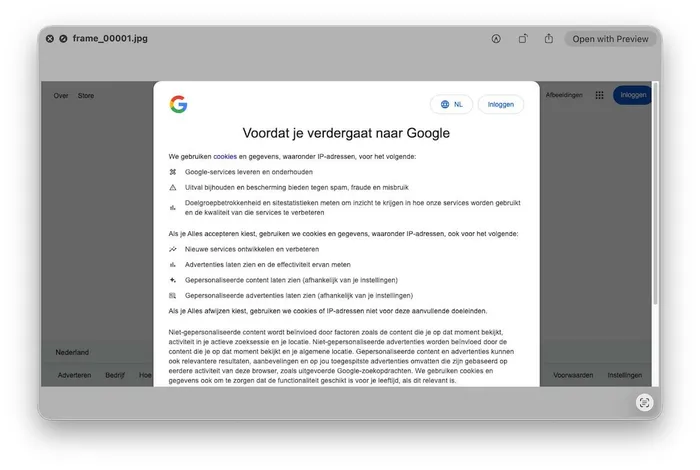
Cookie theft
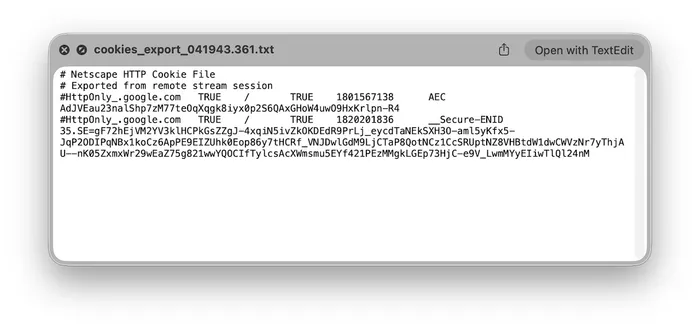
The module steals cookies two ways. Through CDP it calls Network.getAllCookies and writes the result as a Netscape cookie file, and it can push cookies back into the browser with Network.setCookies, letting the operator import stolen sessions directly into their own browser. In parallel, it opens the profile's Cookies database directly with SQLite and re-encrypts every cookie with the same pqz8N3vKxRmY2aLcQ Safe Storage password provisioned by Stage 1, so the exfiltrated profile can be decrypted operator-side:
We detonated the module in an isolated lab to see which path works on macOS 26. The CDP path succeeded: triggering export_cookies produced a Netscape cookie file with decrypted, plaintext cookie values. Reading cookies through the running browser sidesteps at-rest encryption entirely, since Chrome has already decrypted them. The direct-SQLite re-encryption path failed, re-encrypting none of the profile's cookies on macOS 26.
Evading detection
The module injects a script through Page.addScriptToEvaluateOnNewDocument which the author labels as "stealth script" that patches several browser fingerprinting APIs, keeping the headless session from being flagged as automation by the sites it visits.
The module has no persistence of its own. It runs transiently under the main payload, restarting Chrome up to a fixed limit and exiting when the relay drops. In effect the remote_stream command turns an infected host into a live, operator-driven browser running the victim's authenticated sessions, which is a materially different level of access from file collection.
A login panel on the delivery domain
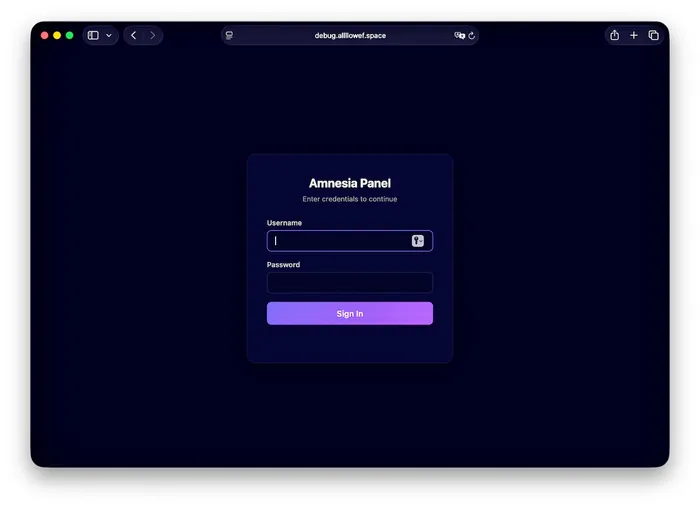
At the root level of the C2 host, debug.allllowef[.]space, a login page titled Amnesia Panel with the subtitle "Enter credentials to continue" and username and password fields are served. This is the operator-facing backend the payload reports to, sitting on the same host that serves the bot API, the payload archive and the upload endpoint, and it is where the family name comes from. A failed login returns its error in Russian, Неверный логин или пароль ("invalid login or password").
Related infrastructure and earlier builds
The delivery pattern generalizes. Every URL we have collected follows the same route and query structure, /d/command?t=<token>&b=<build>, across two apex domains that resolve to the same address.
Conclusion
AmnesiaStealer sets out to harvest credentials, browser data and live sessions from macOS users, and it delivers on some of that more than the rest. Its Stage 1 payload is an effective collector, capturing the login password through a native prompt and stealing the keychain, Apple Notes and documents, even as several of its macOS bypasses are ones Apple closed years ago, with its own shipped debug strings recording them failing. Its Stage 2 stream module is a capable component in its own right: during our analysis it gave live, hidden control of the victim's browser and exported cookies in plaintext over the DevTools Protocol. A working collector paired with a working browser-hijack stage, wrapped around a few dated bypasses, makes it worth tracking.
Jamf Threat Labs continues to monitor this activity and track related infrastructure and variants. In Jamf for Mac, customers can configure threat prevention, advanced threat controls and web protection to Block and Report to help prevent the execution of similar threats.
Indicators of compromise
Read the latest research from Jamf Threat Labs.