How Lean IT Teams Can Improve DEX Without Adding Headcount
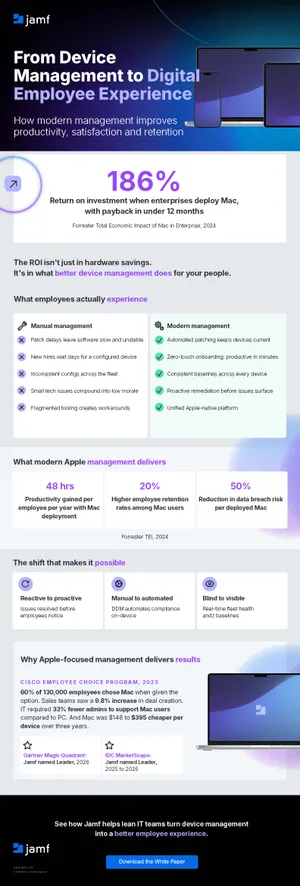
Lean IT teams can improve digital employee experience by automating repetitive tasks, enabling self-service, and improving visibility without adding headcount.

More devices, more demands, same IT team
New hires are onboarded and device fleets scale proportionally, yet employees expect technology to remain as performant as day one. The rub? Many growing organizations worldwide reach the same inflection point: IT teams supporting rapidly evolving environments often remain about the same size.
This asymmetrical growth model increases pressure on IT in several ways:
- Increased workloads per team member.
- Combined smaller tasks add up quickly.
- Spare time spent responding to fires.
- Process improvements are deprioritized.
Adding to the tension, employees typically judge technology’s efficacy by the following factors, such as how:
- Quickly it works.
- Rarely interruptions occur.
- Easily help is provided when it does.
While there’s no “easy button” that addresses every problem in one fell swoop, the good news for stretched IT teams is many practices benefit from efficiency gains for all stakeholders by improving the Digital Employee Experience (DEX).
Achieving this doesn’t require growing in step with the environment but merely tweaking designs slightly. In this blog, we highlight the most critical areas where the greatest gains are made with DEX.
Why manual work becomes harder to sustain
Manual work consumes capacity in predictable ways. A typical manual workflow sees admins performing the following tasks repetitively:
- Configurations are applied physically, one at a time.
- Support requests require personalized response and triage.
- Consistent incident resolution is limited by multiple factors: data collected, distance and device state.
Smaller environments tend to be better suited for manual processes, but as device fleets and headcounts scale, they silently break down as IT is constantly pulled away from work that drives business to refocus on firefighting issues.
What are some examples of silent failures?
- Teams spend much of their time addressing similar types of requests.
- Planning, design and testing slip; and continues getting deprioritized.
- Process and workflow improvements fall behind schedule.
Automate repetitive management tasks
Recognizing where the time goes in your organization is the first step toward getting it back. The next step is determining where any or all of these tasks can be automated.
Automation is the fastest way to reclaim resources because it utilizes efficient practices to consistently execute tasks that never needed a person in the loop to complete successfully.
What are some of the tasks that are well-suited for automation?
Just because a task may be automated doesn’t mean it should be or that it’ll be a good fit for your organization. This disclaimer aside, some common IT tasks are ideal candidates for automation include:
- Provisioning, enrolling and onboarding devices.
- Applying configurations and hardening baselines.
- Deploying managed apps and settings.
- Benchmarking compliance and enforcement.
- Delegating common management tasks to end-users.
- Actively monitoring endpoint health and security.
It’s important to note that, while each point above addresses a critical aspect of the device lifecycle, our list is non-exhaustive. When a consistent, automated workflow handles them, support teams are freed from having to implement (or repeat) them by hand. Additionally, automation also:
- Reduces configuration inconsistencies.
- Prevents introducing human errors.
- Minimizes variables during investigations.
However, automation does not and should not replace expertise.
IT must still be kept in the loop to:
- Decide what standard(s) must be followed.
- Design workflows that best meet business needs.
- Thoroughly test and review results (like exception handling procedures).
- Optimize and improve workflows as technology advances and/or needs change.
Enable employee self-service
In the previous section, “delegating common management tasks to end-users” was mentioned in the list of tasks well-suited for automation. While perhaps not every task is suitable for delegation, some can easily be “handed off” to stakeholders while safely being managed within IT’s guardrails. Consider how implementing self-service workflows would simultaneously empower stakeholders, enhance productivity by reducing delays and ease the administrative burden on IT.
- Password management: Users may easily reset passwords and update supplementary authentication controls, like MFA.
- Install software: Just in time app installs and updates can be performed when users need it from a centralized repository.
- Resource request: Accessing shared data or connecting to VPN while away from the office occurs seamlessly.
What each of the scenarios have in common
They leverage Self Service+ to shift from a reactive model (i.e., the user submits a request then waits on IT for support) to a proactive one (e.g., IT pre-approves the resources and tools end-users have access to, so they’re immediately available to end-users anytime and from anywhere, securely).
Self-service changes the dynamic for both parties: end-users may complete common tasks through a clear, approved path. IT designs a repository whereby all resources and permission requests operate within a secure space aligned to business needs.
Employees gain instant access to the tools necessary to remain productive minus delays, while IT focuses on developing better workflows and driving business value thanks to fewer help desk tickets.
Win-win!
Improve visibility and prioritize IT effort
“You don’t know when you don’t know.” – W. Edwards Deming
When IT teams can’t see where problems are, chances are great that by the time they make themselves known, it has evolved into a much larger (and likely costly) problem. This underscores the criticality that clear visibility into devices, software versions and compliance status plays when prioritizing its attention.
Imagine a third-party app, dependent on a natively bundled tool, stops working after a recent OS update. This was the case in 2024, when users upgraded to macOS 10.15, only to find that native Python support was deprecated. This scenario highlights how important real-time visibility is, providing clear insight into endpoint health that helps identify issues while they remain isolated to just a few devices, before impacting the entire fleet.
Alongside prioritization and security postures, visibility provides insight crucial to determine IT efforts over time. Granular insight supports conversations with business leaders about needs and aids data-driven decision-making.
Create capacity for higher-value work
DEX provides clear benefits for employees and IT. For the latter, its purpose is to ultimately free capacity, allowing IT to focus their efforts and apply technical skills for work that improves the business by refining employee experiences and streamlining routine administration. This opens the door to evaluating new tools and iteratively improving organizational processes.
With each hour of manual work converted toward making technology simpler to use, more reliable and responsive to employee needs, this is where DEX and operational efficiency converge.
Simply put: lean teams that reclaim its capacity find it easier to support growing organizations while optimizing experiences.
When using the resources available to IT, thinking in terms of efficiency is the magic behind using DEX to build management practices that allow IT to scale alongside growing organizations to ease the burden on team members.
Make everyday device management more efficient and the employee experience more consistent.