CloudSyncD: a two-stage macOS backdoor that hides a phished password in zero-width Unicode
Jamf Threat Labs uncovers CloudSyncD, a fake Zoom installer disguised as a legitimate application that uses a phished login password to launch an embedded backdoor while concealing the credential inside a decoy configuration file.

By: Thijs Xhaflaire
Introduction
While performing routine monitoring of executables in VirusTotal, Jamf Threat Labs identified a macOS dropper buried within a disguised Zoom client. We are tracking this malware under the name CloudSyncD, after the daemon name its second stage runs under.
We first encountered CloudSyncD on September 15, 2026, in a build that was plainly still under development. After two days of monitoring, we identified samples of the same family configured against live infrastructure across more than one command-and-control domain, indicating the operators have moved from testing toward deployment.
CloudSyncD is delivered in two stages, both built from the same C++ and Objective-C codebase. The first stage phishes the victim's login password using a fake authorization prompt. The second stage is carried inside the first rather than downloaded separately.
Although CloudSyncD might look like an infostealer at first, due to the way it prompts the user for their password, the password is never recorded or sent anywhere. The malware does not contain built-in features to collect browser data, keychain items or cryptocurrency wallets.
Stage 1: the app_installer dropper
CloudSyncD arrives as a disk image that mounts as a volume named Zoom, laid out to look like any ordinary Mac installer: an application icon on the left, an alias to Applications on the right. The difference is the background image, which carries a numbered Setup list telling the victim to open System Settings, go to Privacy & Security, scroll to the Security section, click Open Anyway, and enter their administrator password.
Those are instructions to bypass Gatekeeper. The bundle is ad-hoc signed, so macOS will refuse to launch it on a double-click, and the artwork walks the user through overriding that refusal by hand.
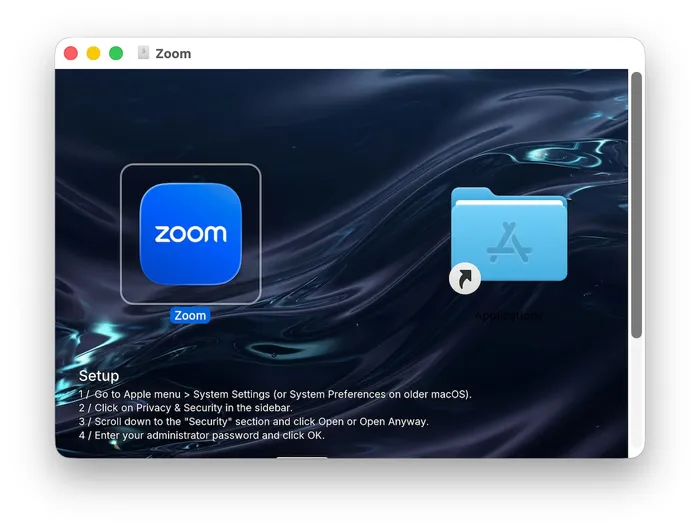
The dropper sits at Zoom.app/Contents/MacOS/app_installer and drives the typical malicious installer experience: the prompt, the credential check, the concealment, the launch of the second stage and the cleanup afterwards.
A fake authorization prompt and local validation with dscl
An Objective-C class named AuthDialog presents the credential prompt. The dialog text reads Enter your password to allow this.and To allow this, enter your password.
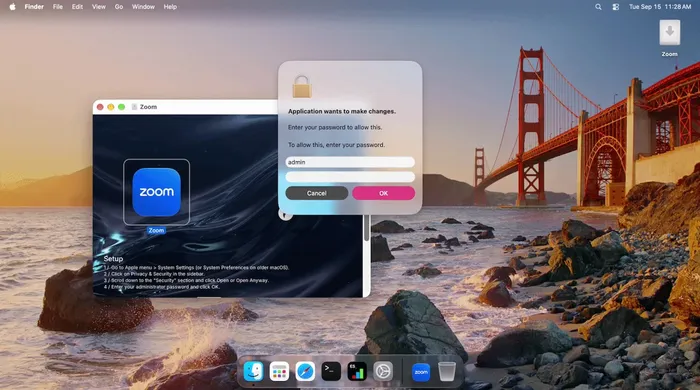
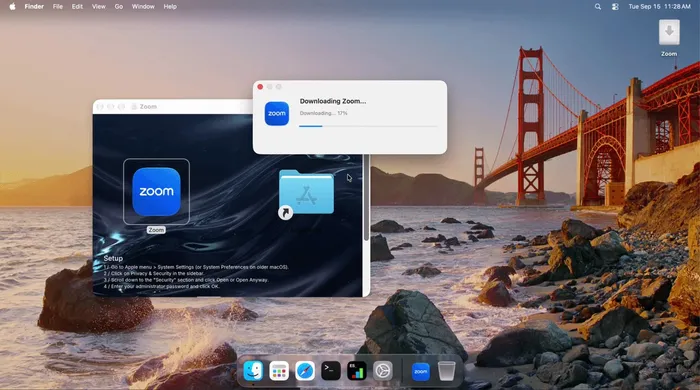
Once a password is entered, the dropper validates it against the local account using dscl and does not continue until the check succeeds. After the password has been validated a fake progress window reading Downloading Zoom... appears.
Hiding the password in a decoy configuration file
The dropper writes the captured credential to a file named data.json under ~/.config/zoom/. The file reads as normal application settings, with a theme, a language and a notifications flag, and this is where the concealment happens.
The password is base64 encoded and buried inside the long cache value, padded on both sides with between 32 and 64 characters of randomly generated filler. Nothing in the file marks where the real value starts or ends. That information lives in the neighbouring version field, whose visible 1.0.0 is followed by 48 zero-width Unicode characters encoding the offset and length of the payload. They are U+200B ZERO WIDTH SPACE and U+200C ZERO WIDTH NON-JOINER, neither of which renders, so substituting a visible glyph for each:
Decoding that run gives an offset of 64 and a length of 8. Reading those eight characters out of cache and base64 decoding them returns the password entered at the prompt. The filler lengths differ on every run, so the offset is never the same twice.
Attempted fileless execution of an embedded second stage
The dropper does not download its payload. It carries a complete universal Mach-O inside itself, roughly 756 KB in the development build, and extracts it at runtime. The same payload is also present on disk inside the application bundle, so the dropper has two sources for it. The dropper first writes the payload to an anonymous file descriptor and attempts to execute it through /dev/fd, presumably to avoid writing the Mach-O to disk. In our testing this failed, with the dropper logging /dev/fd spawn failed rc=13. This technique will fail on the majority of macOS systems due to System Integrity Protection. Upon failure, it uses mkstemp to write the file temporarily to disk, then executes it using sudo along with the collected user's password.
A quick shell script
The dropper also goes on to write a short shell script that sleeps briefly, moves and removes paths, calls open, and then deletes itself.
The script is assembled at runtime from individually obfuscated fragments, written to the system temporary directory as .app_swap_<pid>.sh and executed with /bin/bash. Reconstructed, the template is:
The purpose is an application bundle swap: remove the bundle the victim launched, move a replacement into its place, and open it so an application appears to start normally. The two-second delay lets the dropper exit first, and the open on the failure branch means the victim still sees something launch even when the swap fails. Because the script deletes itself on both paths, it is unlikely to survive on a live host.
Which bundle gets moved in we cannot say. The code has two sources, a .r.tar.gz package the dropper downloads, and a bundle meant to ship inside it. Neither exists in the builds we have: the package URL is empty and the dropper logs [installer] Skipping embedded app extraction (HAS_EMBEDDED_APP not defined). The swap never ran in any detonation.
Blanket acceptance of any server certificate
Both stages include an Objective-C class named CSURLInsecureDelegate that answers TLS authentication challenges by accepting whatever certificate is presented, using SecTrustCopyExceptions and SecTrustSetExceptions.
Stage 2: the cloudsyncd implant
The embedded payload is a universal Mach-O covering both Apple silicon and Intel, and is ad-hoc signed.
The authors left their build filenames in the signature: the Apple silicon slice identifies itself as main-arm64.out and the Intel slice as cshelper. Those two identifiers belong to the copy carried inside the dropper. The copy that ships on disk in the bundle's Resources directory is signed separately again, so the same code circulates under more than one signature and therefore more than one hash.
Configuration and install layout
The implant's configuration is stored encrypted in the binary and decrypted at runtime. Recovered, it describes where it intends to live and which C2 server it intends to talk to:
Composed, those fragments give ~/.local/share/cloudsync/.config/logs/sync.err, which is where the implant writes its log.
We recovered this same set from every build we hold, and only the endpoint differs. Both the daemon name and a separate process disguise field in the configuration hold cloudsyncd, reading as a legitimate background sync service running out of a hidden directory in the user's home. We never saw it used: the implant ran from its staging path under its original filename and only created sync.err inside the install tree.
Remote task execution
The tasking mechanism sits in a routine the authors named handle_task_response.
The implant posts its beacon and expects a JSON object in reply. A response with no task field is treated as a successful check-in with nothing to do. A response carrying a task field is base64 decoded and decrypted, and the result is then dispatched based on what the decrypted bytes turn out to be. If the bytes are a gzipped tar archive, it is unpacked with /usr/bin/tar. If the bytes are a raw Mach-O, it is executed directly on a path the code itself labels legacy. Anything else is discarded.
Tasking delivers executables, not shell commands, so the observable is a newly written or fileless Mach-O rather than suspicious shell activity.
The survey sent on first contact is assembled from sysctl and ioreg. Its fields are hwid, cpu_name, cpu_cores, ram, os, machine_name, user_name, mac, hw_model and the raw ioreg output, the last of which accounts for most of the message size.
What the implant does once it is running
Executing the live build gave a precise picture of the second stage's own activity, and its footprint is relatively small. It:
- Creates its working tree by shelling out:
sh -c mkdir -p '<install dir>/.config/logs' 2>/dev/null. - Reads the hardware UUID the same way:
sh -c /usr/sbin/ioreg -rd1 -c IOPlatformExpertDevice 2>/dev/null. - Creates
sync.errand begins logging, one ChaCha20-Poly1305 record per line. - Sends a host survey of just under 2 KB, then settles into repeat check-ins carrying only the hardware UUID.
Each session opens with a start record naming the endpoint, the host identifier and the attempt ceiling, so the first line of a recovered log identifies both the server and the affected machine without touching the binary:
We did not observe persistence being established: no LaunchAgent or LaunchDaemon, no binary placed at the configured install path, no rename to cloudsyncd, including in the session that ran to its natural end.
The execution chain, end to end
We detonated both builds in a sandboxed environment. Drawing the pieces above together, a single infection runs as follows:
- The victim launches
app_installerfrom the mountedZoomvolume. - A progress window reading
Downloading Zoom...appears, advancing on its own with no download behind it. - The fake authorization dialog is presented and a password entered.
- The password is validated through
dscl, and the dialog repeats until it succeeds. - A package download is attempted three times with increasing timeouts, and fails.
data.jsonis written, with the credential concealed behind filler and a zero-width index.- The fileless launch through
/dev/fdfails, and the temporary-file fallback is taken. - The second stage is launched through
sudousing the harvested password. - The implant creates its working tree, begins logging, and beacons every 8 to 16 seconds
Assessment: from development build to live infrastructure
Several things marked the development build as one that had not yet been deployed: a C2 address on a private network, a placeholder log encryption key, an empty package download URL, verbose debug logging left on, and a log string warning that the embedded decoy application was not compiled in. The credential theft and privileged launch paths worked regardless; what was missing was infrastructure.
That changed within two days. We have since seen several builds of the same dropper configured against reachable endpoints, so far on two separate domains:
The URI path is identical in both, masquerading as a jQuery script so a beacon resembles an ordinary JavaScript fetch. Both domains were registered in 2011 through the same registrar and sit behind Cloudflare, and neither carried any detections at the time of writing.
Every build shares the same string obfuscation table, the same install paths, daemon name and process disguise, and, more tellingly, the same C2 key and initialization vector, down to the identical per-string seeds. Only the endpoint changes. Captured beacon traffic is therefore decryptable with material recovered from any build, and the on-host indicators hold across all of them.
Conclusion
CloudSyncD is a good reminder that although infostealers may dominate the threat landscape, attackers still have use for quieter malware that lies low until further access is needed. Its behaviors illustrate how macOS malware continues to move toward native implementations, string protection, and execution paths that attempt to avoid writing payloads to disk, while still depending on the oldest technique available: asking the user for their password.
In Jamf for Mac, customers can configure threat prevention, advanced threat controls and web protection to Block and Report to help prevent the execution of similar threats.
Indicators of compromise
Read the latest research from Jamf Threat Labs.